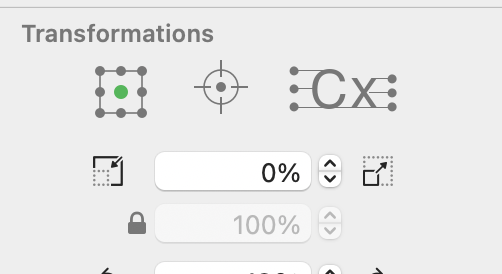
This was mentioned months ago and still persists. When attempting to type a value in the field, the percent size persists and in the wrong place, causing a bizarre miscalculation. I can’t tolerate it anymore!
Which size-change field is this and in which app version?
Understood. I’ll have a look and report back once I know more.
1 Like
Thanks Florian
I cannot reproduce an issue. Could you describe the steps of
I see you have a value of 0% in your screenshot. That is not useful, as that scales everything to zero size.
That is not a screenshot of the actual incident. I had deleted that field so it was not possible to send the actual. I will try to reproduce the incident and get back to you.
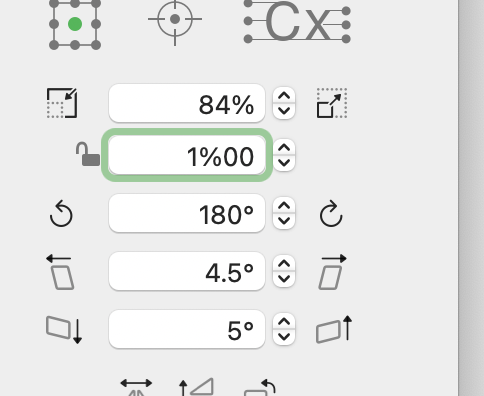
Can’t you just remove the percent sign from the typing box and put it to the right of the field as pixel art?
1 Like
What exactly did you do?
Selected the field and typed “100”
What version of macOS do you have?
I’m also having this problem with Glyphs 4 and Mac OS Sequoia. Also driving me nuts because I change this field very often. v4.1.1

Could you do a small screen recording?
How do I do that?
Here’s a screen recording. I am clicking to get the selection made and then you see what happens. It seems like the second try after the error try works how it should.
Thanks for the recording. I have never seen that.
I can see that it puts the “%” in while you are typing. I can reproduce it in an older version, but not in 4201 or 4202. I don’t think I have changed something related to that text field in a while. So I don’t know what is going on.
Just trying it out more and the double click to select just the number seems to work all of the time, it’s just triple clicking and then entering a number causes the issue. I guess I’m just clicking twice now.
1 Like
This is the same issue I have.