Side bearing deltas / intermediate sidebearings

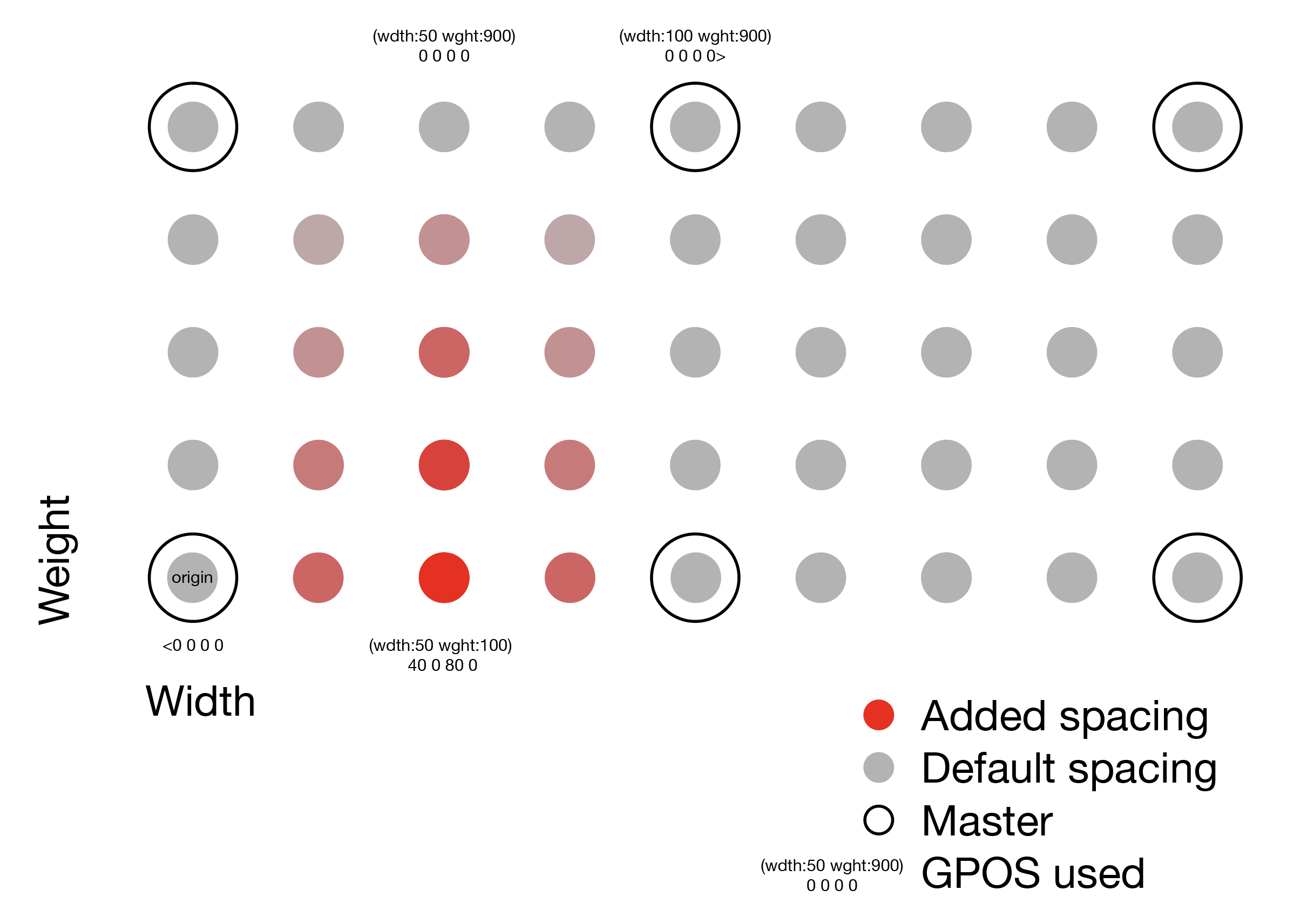
Right, it is between the masters, here’s a diagram:

That works perfectly in a variable font, but I’m not super sure what’s the best way to reliably calculate the same intermediate (semi-red) values for the static instances’ filter, that would match how GPOS does it. In other words what would that function be?

GPOS_value = get_GPOS_for_axes(weight = 25, width = 30)

Do you just interpolate it in one dimension and then in the other? What about the open corners?

1 Like

That is an interesting problem. It needs a script that builds some masters and instances and interpolates some values.

Hello, I am trying to achieve something similar.

I have a project with only a weight and an italic axis. I would now like to add an opsz axis that controls only the spacing. Ideally, in my working file, I would like to add as little as possible in order to keep everything easily editable.

My thought process is the following:

  1. I add an opsz axis and set the same value for all masters (20, let’s say)
  2. I add a “Virtual Master” custom parameter and set opsz to 8.
  3. I add variable GPOS code like in the example above, with something like:
pos @All <0 0 0 0 (opsz:8) 50 0 50 0>;

This would leave my spacing as is for my masters (opsz 20) and add spacing for opsz=8, which is only defined by a virtual master.

Would this work? Do I need a different approach?

2 Likes

That should work.

Confirmed. This works brilliantly. Thank you!

Are there any known issues with variable GPOS support in certain apps/browsers?

As usual, you need to test this. But I don’t know of any problems.

Thank you. Yes, I’m trying to test it as extensively as possible (with no issues so far), but maybe somebody has already encountered some obscure issue somewhere.

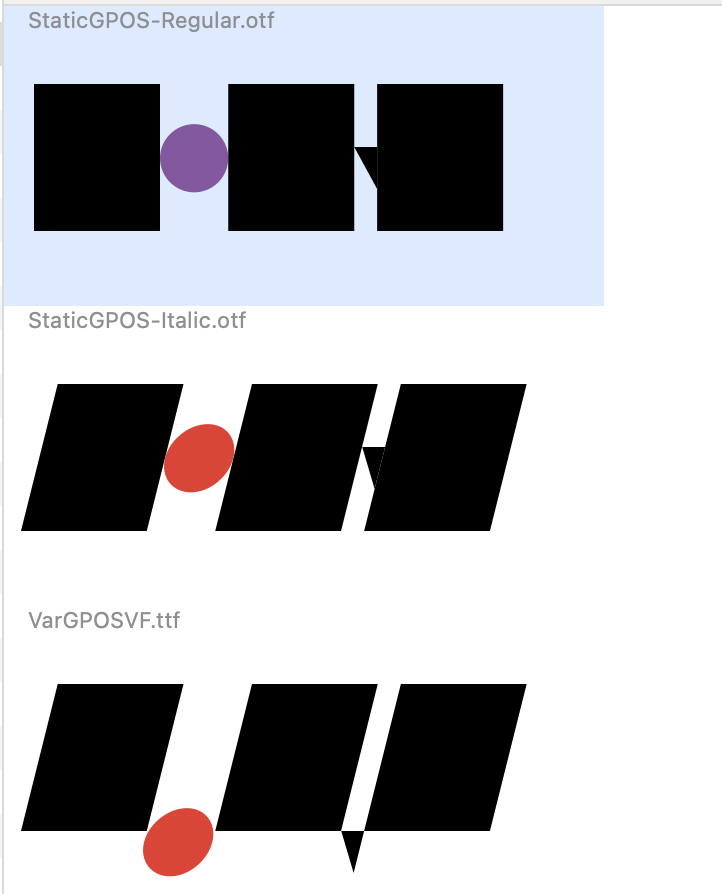
Here’s one problem with 4-values positioning:
I thought of using one set of small figures and GPOSing them for superior/inferiors and fractions. For italics, when you change Y you also need to change X. It works in static exports, but not in variable (not even in Gauntlet).

OTF:

Variable:

Feature:

lookup subscript {
	sub @Figures by @Dnom;
} subscript;

#if VARIABE
pos @Dnom <$subscriptX -200 0 0 (ital:14) $subscriptX -200 0 0>;

#else
pos @Dnom <$subscriptX -200 0 0>;

#endif

File:
Variable GPOS test.glyphs (12.5 KB)

Not sure whether this is related, but isn’t the variable condition

#ifdef VARIABLE

Can you try that? Or am I mistaken?

Same. I copied the conditions from some Georg’s comment.

Either way, it seem to function: on the screenshots it moved the circle vertically from the baseline, but the horizontal offset is missing.

And there is no #else.

There seems to be an issue with the feature compiler. If you add another line (e.g. for one.dnom), it works fine:

sub @Figures by @Dnom;

#ifdef VARIABLE
pos zero.dnom <0 -200 0 0 (slnt:14) -50 -200 0 0>;
pos one.dnom <0 -200 0 0 (slnt:14) -50 -200 0 0>;
#endif
#ifndef VARIABLE
pos @Dnom <$subscriptX 200 0 0>;
#endif

I changed the vertical position in the static instances on purpose to help with the debugging.
Variable GPOS test gs.glyphs (13.7 KB)

I don’t think you can use number values in variable feature code.

Hm, with your code my variable export is:

image

So it seems to actually ignore #ifdef VARIABE altogether (if I remove #ifndef VARIABE it doesn’t move at all). Is there some difference in versions, perhaps? Mine is 3311, it says the latest

UPD: nevermind, it does of course work with VARIABLE, thanks Florian!

Note it needs to be spelled VARIABLE, not VARIABE.

1 Like

@GeorgSeifert, a feature suggestion: can we have number values for virtual masters please? That would allow to control the values between real masters, such as described in this topic

Is there a way to give the virtual master a name? If my true master is “Medium Text” and my virtual master is set up as described above to be the display version (tighter spaced) that it also shows up as “Medium Display” in the font menu?

Your masters aren’t what shows up in the font menu. You need to set instances in your export tab, that’s what will show up in the font menu.

InDesign 2025 (20.3.1) crashes with this setup (for me) and Figma doesn’t show the opsz as a valid variable.

Why/How do you use virtual masters for this? Can you explain your setup a bit more?

Like here.