I have a /nine, which is a /six rotated by 180 degrees. If I switch the component to “Enable automatic alignment”, the sidebearings are fixed, which is very helpful, and exactly as expected.
However, in some masters, moving the component by cursor keys is disabled, and if I try to shift it by mouse, some positions are impossible (unfortunately, exactly the one I want, which is simply rotated around cap/2). It seems to “snap” to a certain y position (which is a useless one in one of the masters), disabling the range nearby. How is this snap height calculated? What is the purpose?
Yes, but vertically flexible alignment (alignment type 3) snaps to certain vertical positions regardless. For example, if you set exclamdown to alignment 3, it will snap to x-height if it’s within 5 units (or so, I don’t remember exactly). And you can’t change this.
Thanks for the hints. In my case, it seems that the y positioning is snapping to the ascender height while it should be the cap height (obviously, rotation around cap_ht/2 implies a y shift of cap_ht). In one master, the ascender is 4 units higher than the cap height (at 250UPM, that is), which catches the component’s y value and disables any positioning within 5 units (absolute, independent of the UPM). Scripting (e.g. my Alignment Palette) cannot override this behaviour. Funnily, the cap height does not seem to have a snap range.
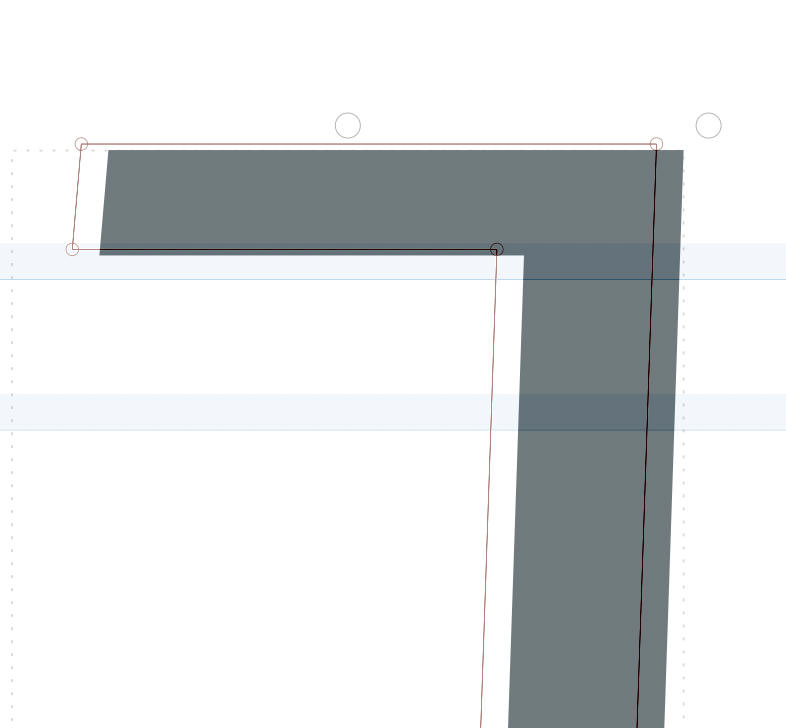
Hello, any developments in this? I find the vertical snapping extremely annoying. Here’s my bracketright.case, which is a rotated component of bracketleft.case. I cannot align it correctly (correct height is visible in the background).
I have a number of geometric shapes and I want some of them as components, rotated by 180 degrees within the cap height. Still, this is impossible as the ascender height is enforced. Surely that’s not the ideal behaviour.