SCarewe
September 19, 2026, 6:21pm
1
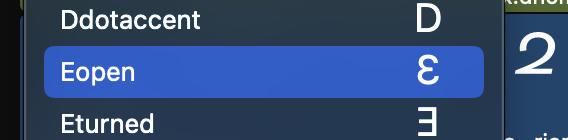
Not sure this is intentional. But if I hit Cmd+C with a selection here:
This is copied to the clipboard:
It would be very practical if this copied something usable, like the selected glyph name(s) instead.
Or am I missing the idea here?
what you are coping is the underlying object. So you get more info that you might like. What do you like to do with the name?
SCarewe
September 20, 2026, 4:41pm
3
I don’t understand what to do with this pasteboard data. Where would I paste it?
In this case, I wanted to paste the names into a GitHub issue (or do some text transformation, find and replace).
Paste it in a code editor. Then you can extract the info you need.
<GSGlyphInfo 0x60f0002f23c0> Eopen, U:0190, script:latin, cat:Letter, subCat:- case:upper prod:uni0190 direction:LTR sort:- comp:->
the name is there, the unicode …
The copy data is the default implementation from the table view. So changing it would mean some extra work.
SCarewe
September 20, 2026, 6:01pm
5
I see. As long as it’s on purpose, fine. Just wanted to check. Thanks.
As I said: this is just a default behavior, not actively added functionality.