I’m using Glyphs 3.2 (3234) and python version 3.11.6 (Glyphs).
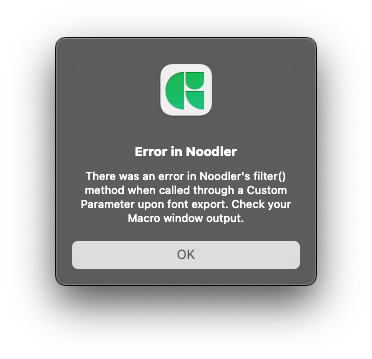
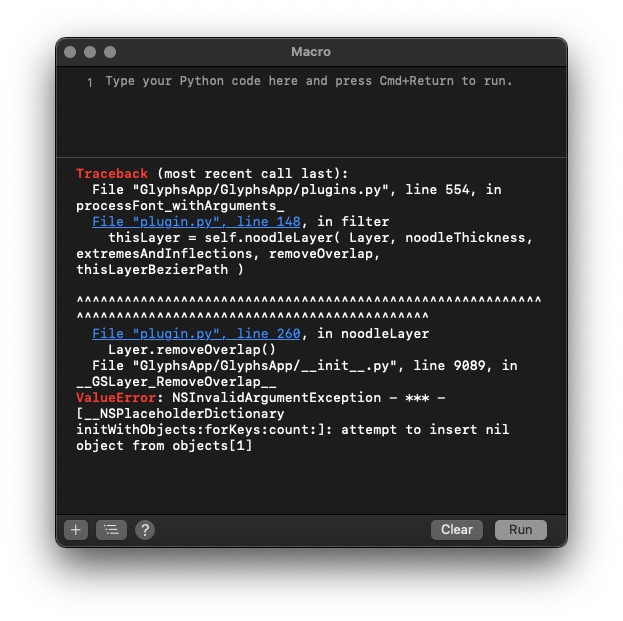
Since today when I tried to export a font with Noodler filter I’ve got this error message.
Am I wrong in my settings below or is there a new way to use Noodler ?

I’m using Glyphs 3.2 (3234) and python version 3.11.6 (Glyphs).
Since today when I tried to export a font with Noodler filter I’ve got this error message.
Am I wrong in my settings below or is there a new way to use Noodler ?
Do you have the latest version? If in doubt, uninstall and reinstall the filter through the Plugin Manager.
Yes I’ve uninstalled and reinstalled both, plugin and modules but still got this error
I’ll have a look.
I have the same issue, started today after installing Glyphs 3.2 (3246).
Can you post the actual error message?
Hi guys,
I have the same problem, Glyphs 3.2.3 (3260)
Tried the different options but the problem remains
Can you send me the file? And describe how exactly do you run the Noodler.
Dear Georg,
I did, thank you!
The problem is fixed in the cutting edge version.
Oh great! Thanks Georg!!
Hey @mekkablue quick note on the Noodler Plugin. It does not seem to be compatible with Glyphs 4 anymore? At least not in the current version 4.1-4107. Just wanted to let you know!
Thank you for checking
Thanks for pointing this out, I’ll have a look.
Workaround: For most use cases, the built-in stroke options do a better job now.
Thank you Rainer,
looking forward to it. We are using the Plugin on Export only via the custom Parameters. As far as i know you can’t do that with the built-in stroke option?
