Error when loading plugin: “The bundle couldn’t be loaded because its executable couldn’t be located.”

Hi there,

I’m working on creating my first plugin.
I would like to use my Python script on exporting instances.
To achieve this, I need a plugin that allows me to run the script during export.

I’ve been following the instructions from:

However, I always get the following error when I reopen Glyphs:
The bundle “Snap Near‑Axis Handles” couldn’t be loaded because its executable couldn’t be located.

Could anyone advise what I’m doing incorrectly? I upload both the Python script and the plugin, but an error appears each time I relaunch Glyphs.

I use Glyphs (3414) and Python Version 3.11.9 (Glyphs)

thank you

SnapNearAxisHandles.glyphsFilter.zip (2.0 KB)

Production_Round-Horizontal-And-Vertical-Handlers.py.zip (1.7 KB)

…I found out what was the problem maybe it helps someone else.

Error I saw

The bundle “Snap Near-Axis Handles” couldn’t be loaded because its executable couldn’t be located.

What was actually wrong

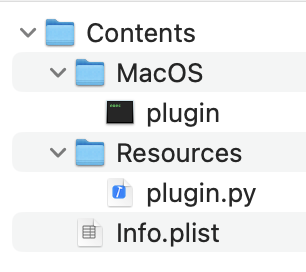
Missing loader: Contents/MacOS/plugin wasn’t in the bundle, but Info.plist had CFBundleExecutable = plugin.

No entry declared: PyMainFileNames wasn’t set, so Glyphs didn’t know to run Resources/plugin.py.

Export hook returned a value: processLayer_withArguments_ didn’t return None, which the bridge expects.

What fixed it

Added the loader and made sure Info.plist points to it:

CFBundleExecutableplugin

Declared the Python entry file:

PyMainFileNamesplugin.py

Made the export hook return nothing:

def processLayer_withArguments_(self, layer, arguments):

parse arguments…

self.filter(layer, False, params)
return None

Correct bundle layout (working)

Plugin.glyphsFilter
└─ Contents
├─ Info.plist
├─ MacOS
│ └─ plugin # required loader (executable)
└─ Resources
└─ plugin.py # your filter code

In case someone is interested in the plugin:
Snaps near-horizontal or near-vertical Bézier handles to perfect axis alignment within a set tolerance—usable from the Filter menu or applied automatically on export.
SnapNearAxisHandles.glyphsFilter.zip (17.6 KB)

You can find templates for plug-ins in the GlyphsSDK.

For example, for a filter plugin, the template files – including the “MacOS” folder and “plugin” file – are located here:

It should look like this:

…perfect, thanks Florian :+1: