I’m adapting the Font Info Batch Setting script for a specific use. I added the Font Name and License attributes, but I’m unable to find the Glyphs scripting attribute name for the ‘trademark statement’ (appears after the language popup.
Most of the keys end with a s because there can be more than one entry in different languages. You can see it in the UI when you get a language selector or not.
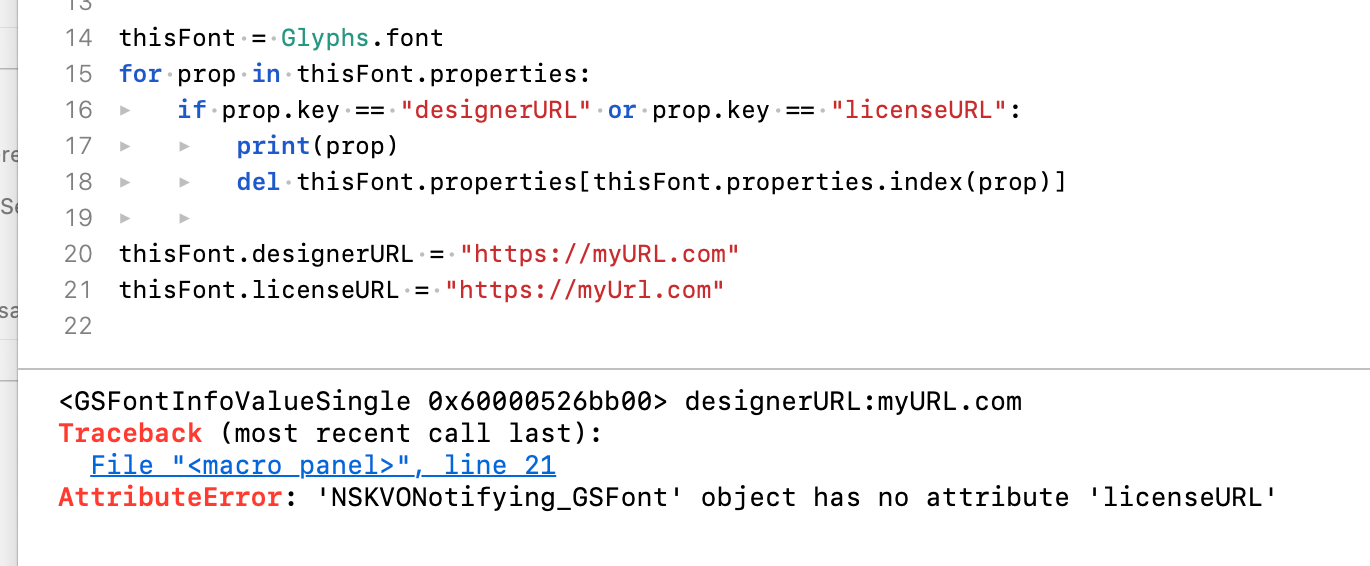
I’m back to working through this task and am still having a problem with “licenseURL”. Maybe I have a typo, or it might not work the same as designerURL, or… . I’m able to manually create licenseURL (single) in Font Info dialog, but when I attempt to script it I get a ‘no attribute’ error. Any advice is appreciated.
I am having a similar issue setting licenseURL, vendorIdentification and versionString. Is this something that will be supported eventually or the safest way is to set it up using font.properties[…]?
All those keys are in font.properties now. When you open a Glyphs 2 file, they are moved up automatically.
If you add them in a new file, always add them in the General/properties section.
So doing something like font.properties[“Version String”]what you would suggest both in Glyphs 2 and Glyphs 3, then? I am writing a simple script to make an initial set-up of Font info’s General panel for my files.