Glyphs 4 freezes when adjusting Smart Component values with custom stroke settings

Hello,

I would like to report a freezing issue I encountered in Glyphs 4 while working with Smart Components.

I have been developing a Python script that automatically adjusts the Height and Width values of Smart Components to match the bounding boxes of reference outlines.

The script works correctly in Glyphs 3. However, when running the same algorithm in Glyphs 4, the application would freeze and become unresponsive.

After extensive testing, I believe I have identified a specific condition that triggers the issue.

Steps to reproduce:

  1. Create a glyph containing a stroke object in Glyphs 4.

  2. Apply custom values using the local stroke adjustment controls, such as the controls for stroke thickness or angle at individual nodes or stroke ends.

  3. Use this glyph as a Smart Component with Height and Width axes.

  4. Insert the Smart Component into another glyph.

  5. Attempt to change its Smart Component values programmatically using Python.

Observed behavior:

Glyphs 4 freezes and becomes unresponsive when the Smart Component values are modified.

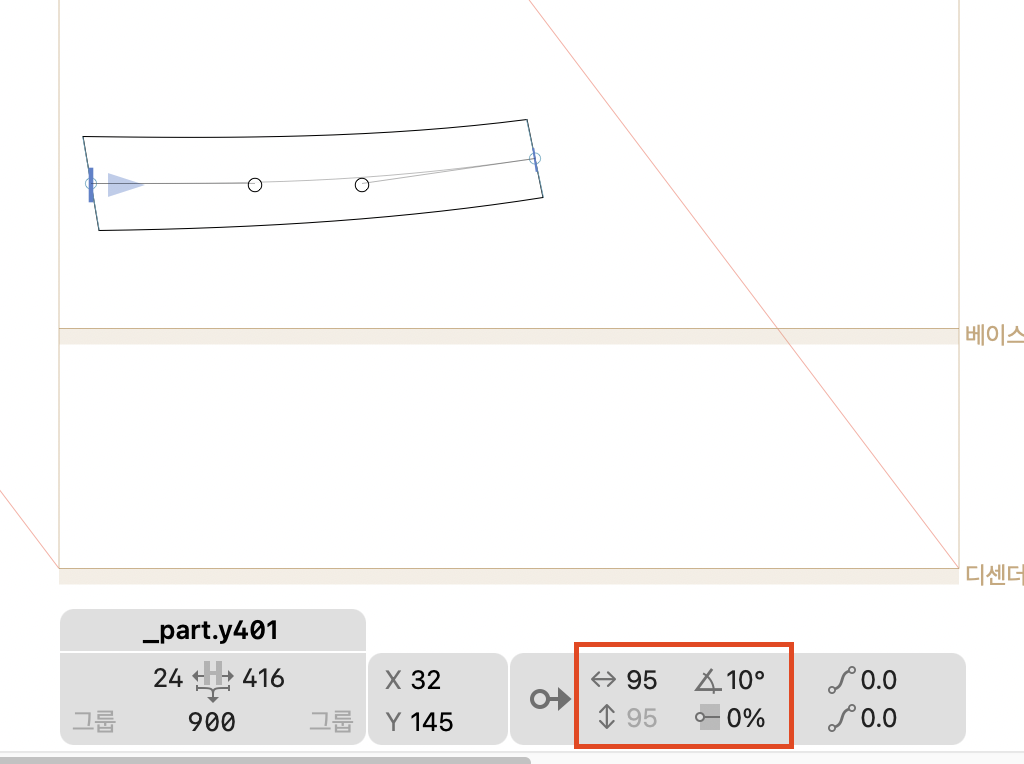
In my case, the problem occurred with a component named _part.y401, which contained custom local stroke settings.

Workaround and test results:

After removing the custom local stroke settings from _part.y401 and reconstructing the component without those settings, I ran the same Python script again.

This time, the script completed successfully in Glyphs 4. All five Smart Components were adjusted to their target bounding boxes, with a maximum error of 1 unit.

No changes to the optimization algorithm were necessary.

This strongly suggests that the freezing issue is related to the interaction between the local stroke adjustment feature and Smart Component interpolation or extrapolation.

Additional information:

  • The script repeatedly modifies Smart Component Height and Width values and measures the resulting bounding boxes.

  • Some Smart Component values extend beyond their defined interpolation range.

  • The same overall workflow works correctly in Glyphs 3.

  • Removing the custom local stroke settings resolved the freezing issue in my test.

Could you please investigate whether the local stroke adjustment feature in Glyphs 4 may cause a conflict when Smart Component values are changed?

I can provide additional screenshots, logs, or a sample Glyphs file if needed.

Thank you!

Could you send me a sample file?

I’ve attached the file.

Please take a look at the Hangul glyph “oel-ko” (Unicode: C680). It contains a test component named _part.y401.

When working with smart components, I usually design and adjust their shapes by dragging them directly with the mouse. If you select this component and try to adjust its width by dragging it horizontally, you should be able to reproduce the freezing issue.

Additionally, when adjusting the Height or Width smart values, the shape only appears correctly at values of 0 and 100. At intermediate values from 1 to 99, the expected interpolated shapes do not appear. (The same issue also occurs with values below 0 or above 100.)

This freezing issue did not occur in Glyphs 3. Of course, the ability to apply local stroke thickness adjustments or custom angle adjustments to nodes at stroke terminals was introduced in Glyphs 4, so this particular functionality does not apply to Glyphs 3.

I have also confirmed that smart value adjustments work without any issues in Glyphs 4 as long as these new Glyphs 4 features are not used.

As a Korean type designer, and as I have mentioned before, I rely heavily on smart components and strokes in my workflow. This makes me particularly sensitive to issues like these.

I understand that the bugs I have reported so far, as well as those I may report in the future, might not seem particularly significant to designers who primarily work with Latin scripts. Nevertheless, for the sake of Glyphs’ overall reliability and stability, and for the many users working with East Asian writing systems, I sincerely hope these issues can be addressed.

Thank you very much for your continued work and consideration.


P.S. You may already be aware of this, but there is another issue in Glyphs 4: when a custom angle value is applied to a stroke terminal, the overall stroke thickness increases unexpectedly. In other words, the resulting stroke becomes thicker than the original H value I entered. I would appreciate it if you could also look into this issue.

for-testfile.glyphs (126.7 KB)

Can you try Glyphs 4.2 (it is currently a cutting edge version, activate it in Settings … > Updates).

1 Like

As you suggested, I updated to the Glyphs 4.2 cutting-edge version, and the freezing issue has been resolved!

However, it seems that the shapes of the smart components still become distorted in unintended ways depending on their smart values. I hope this issue can also be resolved eventually, although I understand that it may be a difficult problem to fix. For now, I’m extremely happy that the freezing issue has been resolved!

Thank you so much for taking the time to listen to my concerns and for your thoughtful and helpful response. I really appreciate it!

Can you point me to an configuration that shows the problem and describe what you expect?