I have this issue with Glyphs 4 on a mac mini with an M4 processor: holding the Option key and moving the cursor causes a visual glitch where glyphs zoom in and overlap.
This didn’t happen to me in Glyphs 3.
Here is an example before and after holding the Option key.
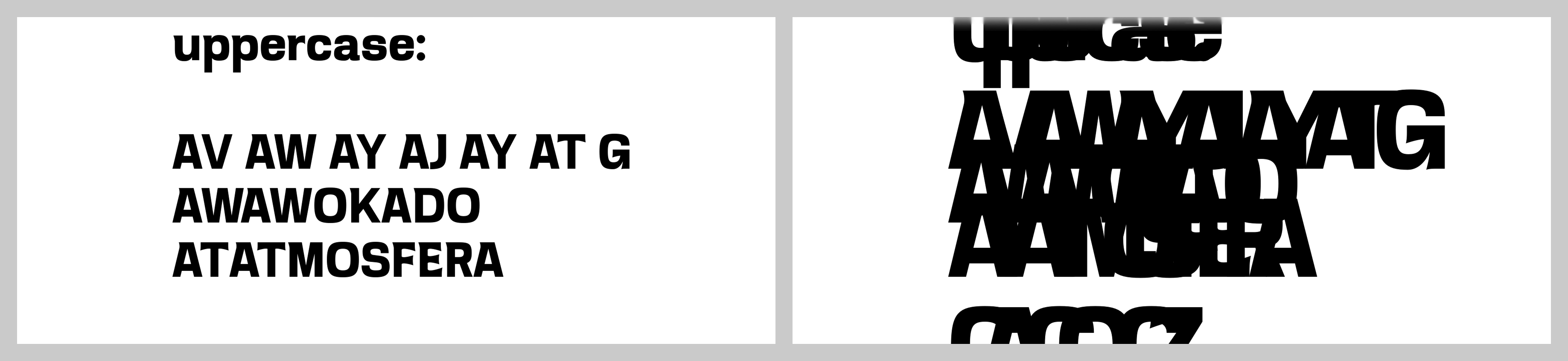
EDIT: I’ve discovered that it isn’t visible at exactly 261 pt preview size and for bigger values it is zooming out to 261 pt.
Can you make a screen recording?
Sure, here is an example:

Can you make it so that the full window is visible?
Does this happen with only a few glyphs in the edit view?
It happens to all glyphs.
Something I’ve noticed: I’ve been working with other file today and there it didn’t happen. The difference I can see is the file with this problem uses corner components and the other one is without corner components. But I’m not 100% sure if it’s the main reason.
Plus the file with the problem uses some custom glyphs for logo.
So it also happens if you only have 2 glyphs?
And can you try to start without plugins. Hold down the Option + Shift key when you start Glyphs.
Thanks! It worked. It seems that plugin Ultimate Measure caused the problem in this particular file.
do you get anything in the Scripting window when that happens?
No, I can’t see anything there. But I can confirm now that it is caused exactly by this plugin.
I can confirm that I had the same behaviour happening when I had the Ultimate Measure plugin installed on all the Glyphs 4x versions.
I can’t reproduce it. In Glyph, can you do “Help > Copy Diagnosing Info” with the minimal number of plugins that shows the issue? and paste it here or in a private message?
1 Like
Sorry for the delay, here it is (only Ultimate Measure installed and not even turned on by “View → Show Ultimate Measure”):
Glyphs 4.0.1 (4004)
Mac OS 26.5.2 (arm64)
Python 3.14.6 (Glyphs)
| Plugin |
Version |
Ref |
| UltimateMeasure.glyphsReporter |
1.0.1 (2) |
|
| Repository |
Size |
Ref |
| Python |
103,1 MB |
(not a git repository) |
| fonttools |
58 MB |
65840bb |
| UltimateMeasure |
2,1 MB |
2eed04b |
| vanilla |
4,6 MB |
7ec2205 |
Can you check if it happens when you have only one edit view tab open? If not, then I have fixed it.
With one edit view tab opened it doesn’t happen. Even with Ultimate Measure installed and turned on.
Can you try the latest cutting edge version (activate it in Settings … > Updates). It should be fixed now.
It’s working just fine, thank you!