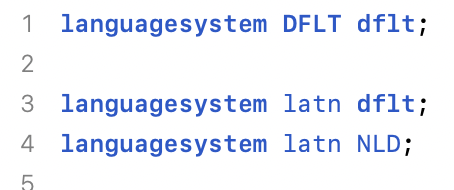
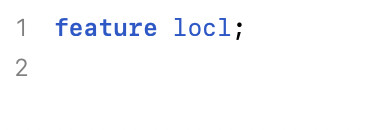
I think I’ve done this step before, however, this time I have questions about the code Glyphs has auto generated in File → Font Info → Features. I have listed my questions below and attached screenshots:
Question #1:
Under the “Prefix” tab, I see a listing for “Languagesystems.” In here, I see the command languagesystem latn dflt; and languagesystem latn NLD;. The article explaining how to handle the Dutch “í-j or Í-J” edge case said that languagesystem latn NLD; would be added. That said, I don’t know if languagesystem latn NLD; is overriding the languagesystem latn dflt; command which comes before it. Are both commands necessary? If so, why?
In the “Features” sidebar tab, I see something labeled “aalt.” It has one line of code in it that doesn’t seem to do anything. it is feature locl;. Is this line needed or not? If so, why?
My font is all uppercase. I assume this is why Glyphs didn’t autogenerate the command sub [i j]’ @CombiningTopAccents by [idotless jdotless]; under “ccmp” as mentioned in the above article. Is this correct?
1: I would leave it as it is if you don’t have a better idea. Is it necessary? Depends on what you want to achieve. Read about script/language assignments in the OT Spec on Microsoft Typography documentation - Typography | Microsoft Learn if you really want know more and are techy enough.
2: aalt has a reference for all one-to-one substitutions, so an app like InDesign can determine alternates for glyphs. Let Glyphs autogenerate it.
3: do have a look at the all-caps tutorials. There’s a special case for the idotless and Turk languages.
Thank you for your response. I have a few follow up questions for you. I will number my follow up questions based on your most recent responses…
All I’m trying to achieve is to make sure the Dutch “í-j and Í-J” edge cases are handled properly. Based on what I’ve read, it sounds like the OpenType engine will only use the languagesystem latn NLD; command if the language for an application using your font is set to Dutch. Otherwise, languagesystem latn dflt; is the fallback your font needs to work properly and should be kept in the code. Is this correct?
I have no follow up questions for response #2 in your most recent post.
Thank you for telling me about the special case for the idotless for Turk languages. I also need a direct answer to question #3 in my last post. I asked if Glyphs didn’t autogenerate the command sub [i j]’ @CombiningTopAccents by [idotless jdotless]; under “ccmp” because I have an all-uppercase font. Is this correct or incorrect?