Hi everyone, from the very first day I fell in love with Glyphs as a native macOS app. It’s a well-crafted and programmed app.
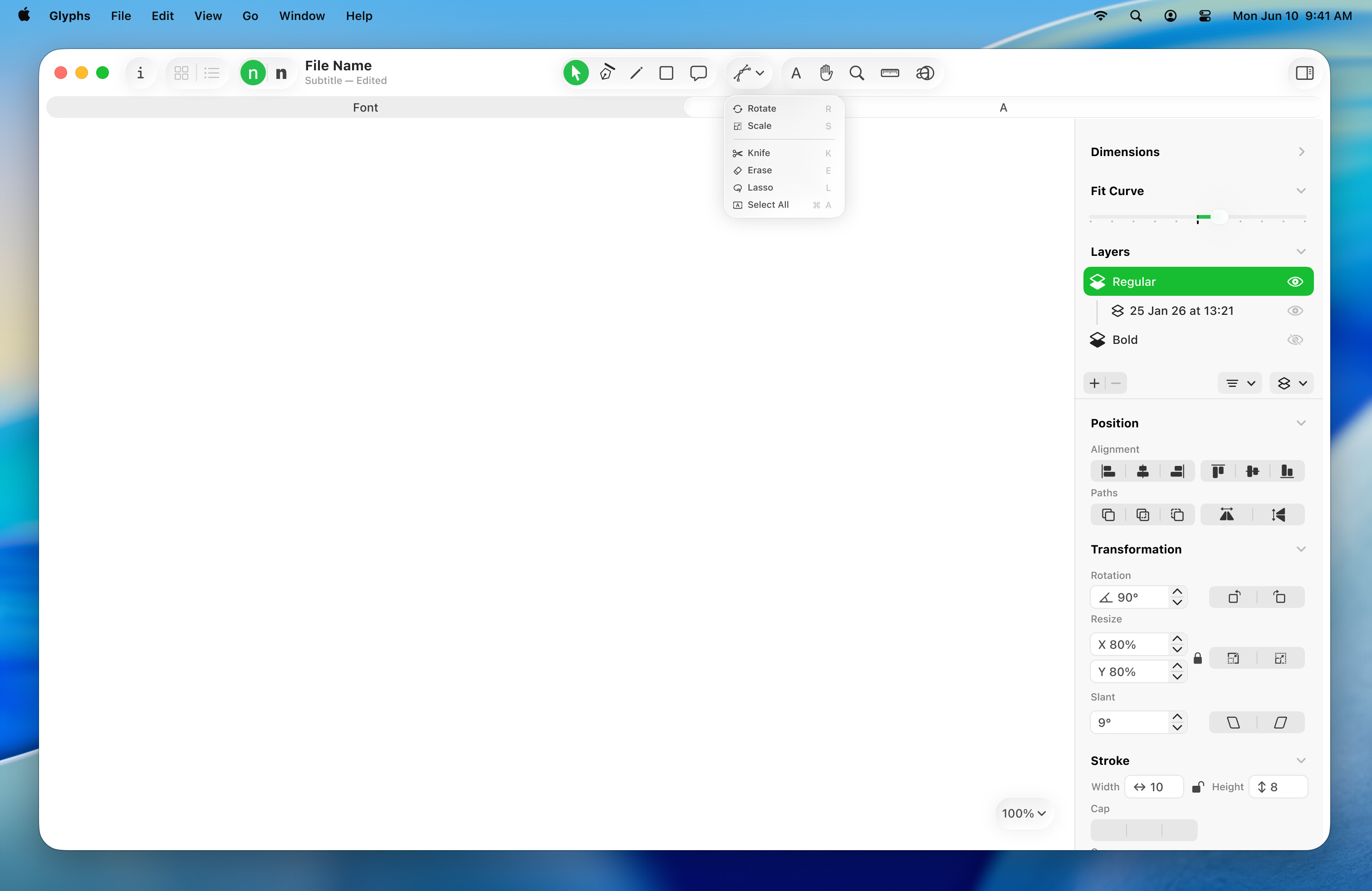
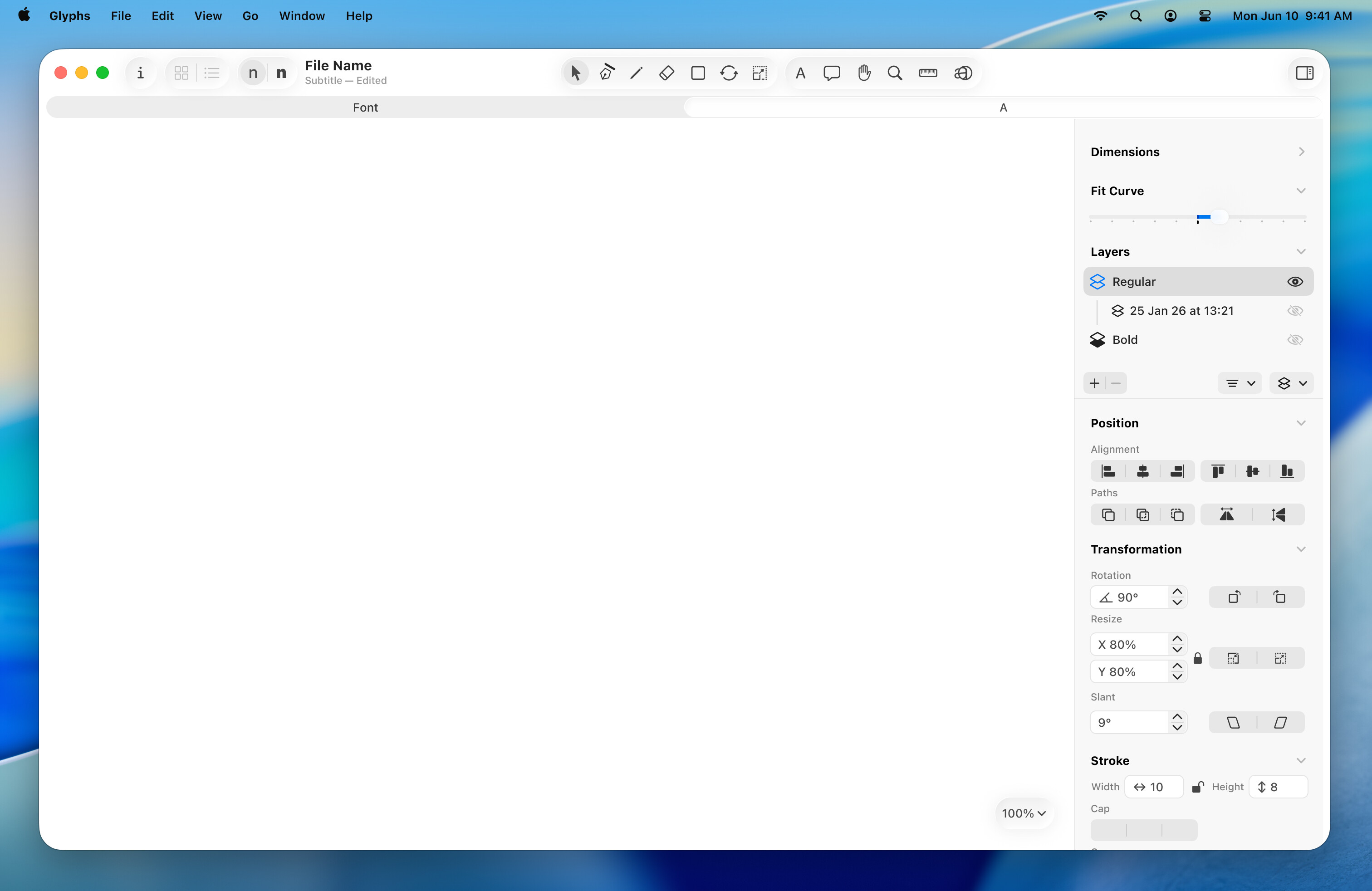
As a UI/UX guru, I noticed a few small details that could be improved. I suggest that Glyphs follow the best practices outlined in Apple’s Human Interface Guidelines. I’ve made this demo suggestion to upgrade the Glyphs app to the latest Liquid Glass material.
Besides some missing icons that need to be redrawn, I’ve used the default Apple icons as a starting point.
I’ve also made a few suggestions to the toolbar. I’ve separated the editing/drawing tools from the viewing options to avoid confusion. Additionally, I’ve grouped the less-used tools, such as manual rotation and manual resize, into a submenu.
Also revamped the sidebar controls. And adding the green Glyphs brand color for selections.
Personally I dislike the idea of grouping the tools as shown here; we have very different common/less used tools in our workflows and I’m sure others are further different still. I don’t mind having the icons all visible as they are now, they’re already fairly unobtrusive.
I quite like the groupings in the transform panel though!
Thanks for your feedback. I agree with you about the less used tools. The design is just an initial idea that should also consider all usage statistics. Additionally, there’s an easy approach which is customizing the toolbar, similar to what browsers and apps have.
I would agree if it was an Adobe product whose toolbar space is vertical and thus in dire need of organisation, but not so much in Glyphs at the moment. It may be fighting for space against masters buttons though (when you have lots of masters), but I think they are the ones who need better organisation in my opinion.
I’m not fundamentally against grouping tools where it makes sense, but I don’t want one button where everything goes.
I would prefer that the tools not be shuffled around. Any human interface has its problems. The biggest problem is being a moving target. After 10 years of using Glyphs, I have habituated the placement of tools and like the idea of having them all visible. Please don’t decide for me what I want to see. Don’t become like Adobe. They had a fine interface in AI 8, but have thoroughly f***ed it up since then. I am not saying the current interface is brilliant, but I know it, and don’t need to play hide-and-go-seek with something new.
The only oddity is that the “Transformations” tools under “Paths” is a tough logic to follow for a newcomer. I would also add an area below the “Transformations” section of the toolbar/palette on the right that allows access to the same features that now reside under “Paths”. I am NOT saying to remove them from Paths, this would confuse long-time users. I am saying to add them to the palette with all the other tools.
I would prefer that any UI not “think” for me, just show me where the tools are.
That’s rather tiring to look at for hours because colored highlights needlessly keep begging for attention and I already know what tool or layer I’m on. Please, no.
I’m pretty happy with how Glyphs App UI looks and works at the moment, and I am against the idea of updating established working patterns for the sake of ‘brand’ recognition or simply for the sake of following another company’s imperative to update for the sake of novelty – and profit.