Hellbox: a native macOS proofing app with a live Glyphs connection

Some of you may be familiar with idiotproofed.com, a web-based proofing tool I made with Very Cool Studio in 2018. I have been building Font Proof on and off for a few years since (link at the bottom of this post). It’s a native macOS proofing app, and is now stable enough to share.

For Glyphs users: it watches your Glyphs file and updates when you save. Edit a point, change spacing, or toggle a feature, and the proof updates. No exporting and re-importing.

You also work on the actual PDF the whole time, not a separate preview. Swap a font, change spacing, or add a section, and the PDF updates.

Some notable features:
• Proof types: waterfalls, glyph grids, columns and rows, style comparisons, basic text, and markup annotation
• Inline font mixing: auto mode distributes styles across running text by weighted probability; manual mode lets you tag exact ranges with specific styles
• Linked text files: point a .txt, .rtf, or .md at any section or grid cell, and the proof updates when you edit the file
• Templates: built-in section templates (pangrams, spacing tests, kerning pairs, diacritics for 26 languages) and proof templates that save sections, fonts, settings, and page size, so you can drop a new font into a proof you already built
• Markup: freeze a PDF snapshot and annotate it with a freehand pen and text notes, with adjustable colors and stroke widths, saved inside the proof file

Pricing: $100, one time. No subscription, no seats, all updates included. There is a 14-day free trial with no card required, and you buy the license inside the app. Students can email me for a discount (email is on the site)

Requires macOS 15 or later. Direct download. If you try it and something feels off or missing, would love to hear from you.
11 Likes

This looks awesome! Any chance support will be expanded for older MacOS versions?

1 Like

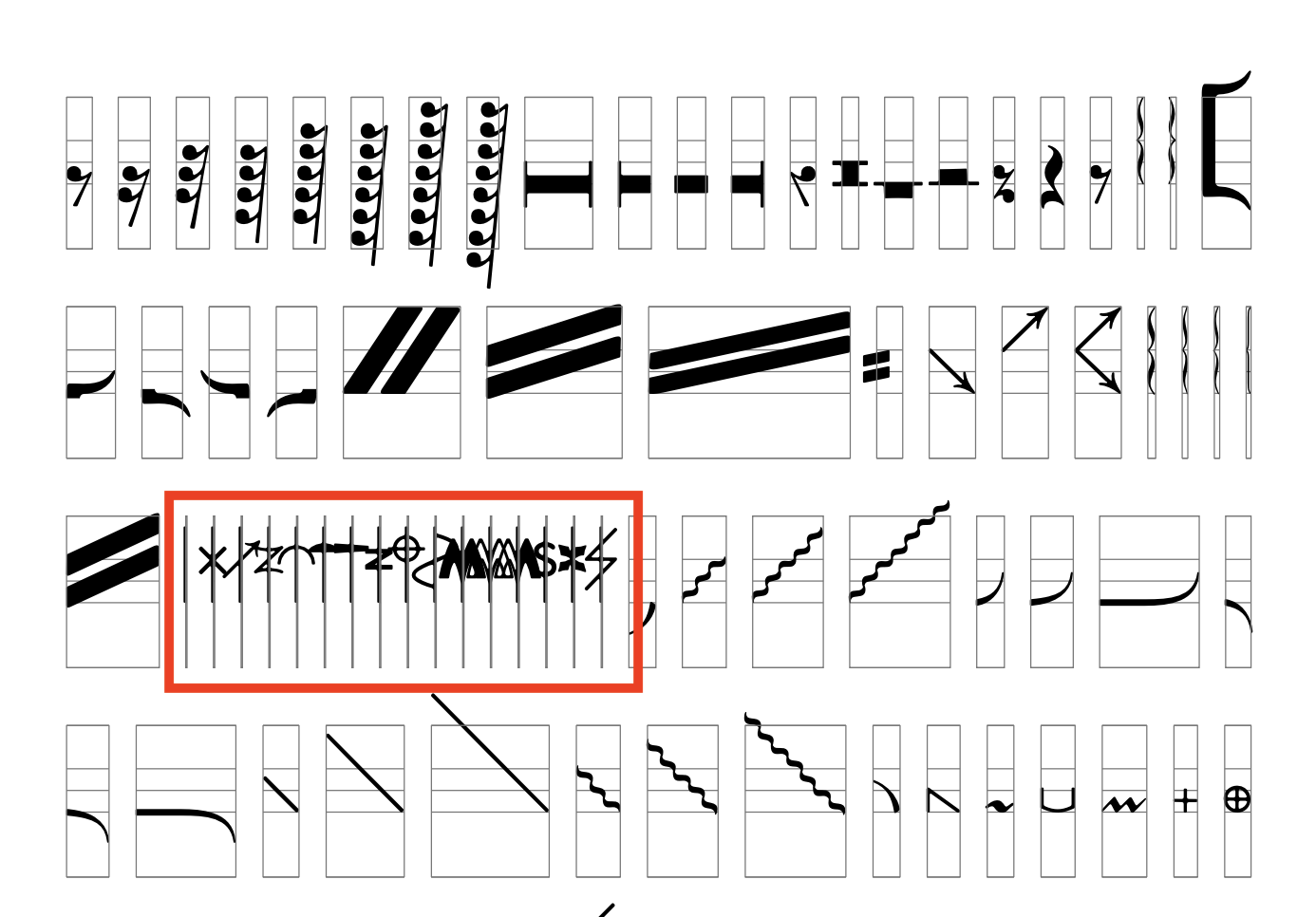
Really useful. Is it possible to control the spacing for individual glyphs? I’m working with a symbolic font which has some 0-width glyphs, and they overlap on the grid. It would be great to have more control options.

1 Like

I am looking into it now that the V1 is out, but no promises. Which version are you running?

Do you mean adjusting left and right sidebearings in Font Proof instead of in Glyphs? If so, I’d be curious to hear more about the use case. Currently, there is no way in Font Proof to do this.

Here’s an example. The glyphs in the red rectangle have zero-width and negative side-bearings (both LSB and RSB). An option to add negative side-bearing value to the space between glyphs would be useful.

Ah! Ok. I will look into this!

1 Like

Looks amazing! I will buy if you get it working for 13.7.8.

1 Like

This is great! And I really, really appreciate the fact that it’s not subscription-based. I’ve always said I would happily pay 300–400€ once for a solid proofing tool, but never a subscription.

In case you are taking feature requests, one thing I would really appreciate: A combination with Light Table, or some other way to proof different versions together. I’m especially thinking of spacing/kerning proofs which show the difference in texture/rhythm.

I look forward to digging into this further!

3 Likes

I just downloaded it. I need some time to be able to use it properly (could use a one-page instruction sheet).

1 Like

Yes. Great idea. Let me know if there’s anything specific you aren’t sure about.

I’m still running MacOS Monterrey (12.4). If my machine could run Font Proof I’d definitely purchase it! Like Sebastian, I greatly appreciate the one-time-purchase model.

1 Like

This looks great. Thanks so much for making it. I was expecting to see some similar built-in features with idiotproofed - like showing alphabets of the scripts included in the font. Is there a manual or a video showcase available?

1 Like

Perhaps there could be an option that each item is NOT on its own page? Wasting a lot of paper printing proofs. Maybe, just add 2 lines between each section instead of a page break?

1 Like

That makes a lot of sense. I’ll add it to the backlog.

There isn’t right now, but I am working on it!

1 Like

Thanks Reese. Unfortunately, dropping down to 12 or even 13 comes with some major baggage. I’ve looked into it and my initial conclusion was not to support below 14. I realize this is a bummer, but I am a one man show! I will reassess but for now, no promises. Sorry!

1 Like

Thanks Sebastian. I will take a look and add to the backlog!

Update: Actively looking into supporting macOS version 12.

2 Likes

Congrats on the launch, Jake!

Are you familiar with another app called Font Proofer by Peter Nowell? It is—as far as I know—the only proofing tool that is a Mac app that connects to Glyphs, and has been in active development since 2023. It seems like Font Proofer has many similar features to your app, some of which were demoed at ATypI last year.

That aside, can you say more about your decision to give your app such a similar name? I fear it could create some confusion in the marketplace.

Peter, by the way, is one of the most generous and decent people I know. I am sure he’d be willing to chat amiably with you about this, where other folks might (rightly) light fires.

8 Likes