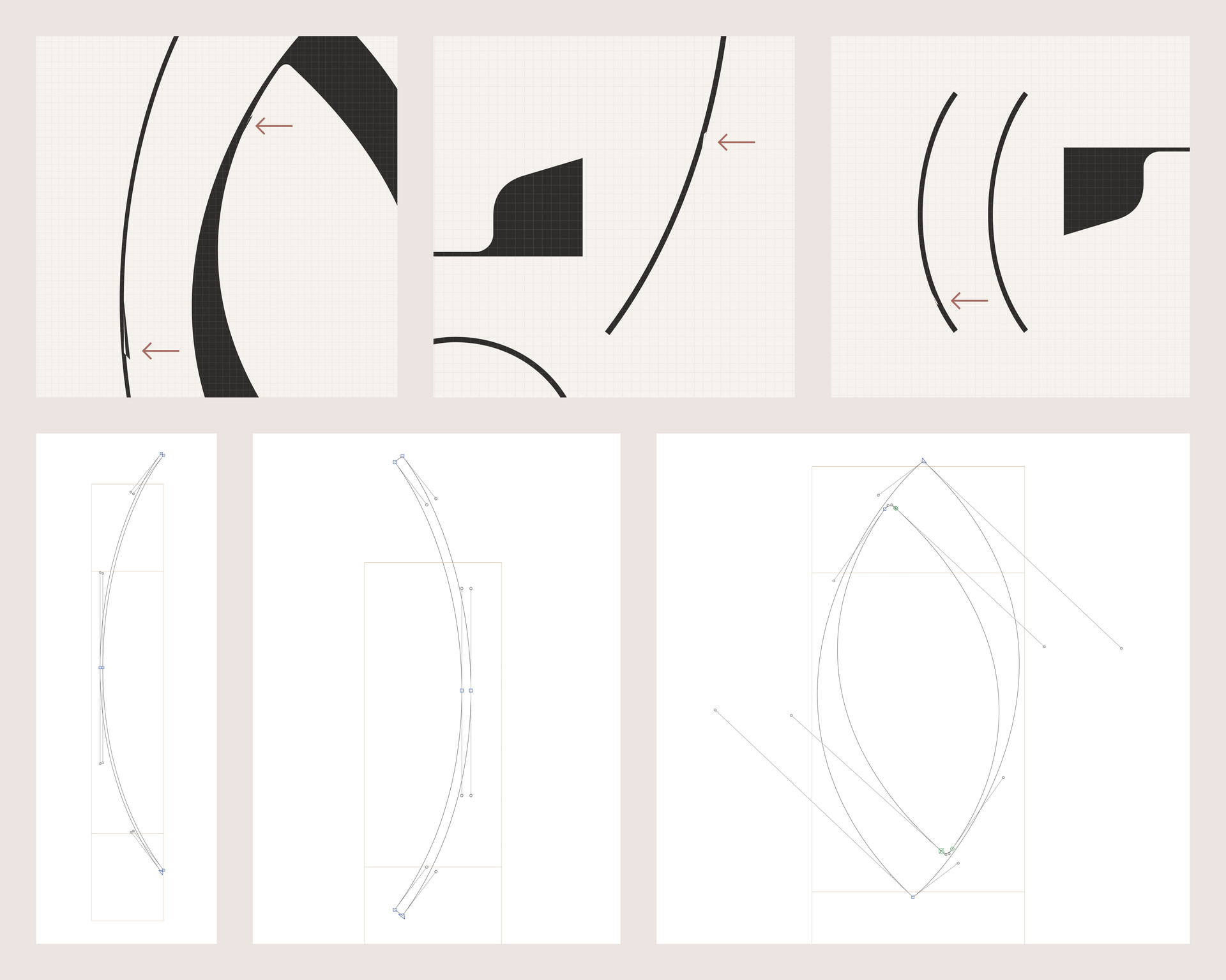
Hi, I’m struggling with strange visual artifacts (pictured) in my exported typeface. These sharp little glitches appear at “conditional” locations and severity based on the type size and the actual content of the text — adjusting either of these conditions causes the artifacts to disappear / appear elsewhere, and restoring the same conditions causes the artifacts to replicate as they were.
I can only produce this issue in Figma. However, I don’t have this problem with other typefaces in this software, so I assume the issue is inside my type file. It only happens with live type; outlining the type removes these artifacts rather than exposing them in vector form.
These artifacts seem to only appear on curved punctuation and the letter “O” and I can’t find anything wrong with the paths (also pictured). I’ve corrected the path directions, I’m removing overlap on export, and there’s neither auto nor manual hinting.
Is this a common issue / is there a way to fix this? I can’t seem to find anyone dealing with this and I’m at a loss for any more troubleshooting ideas.