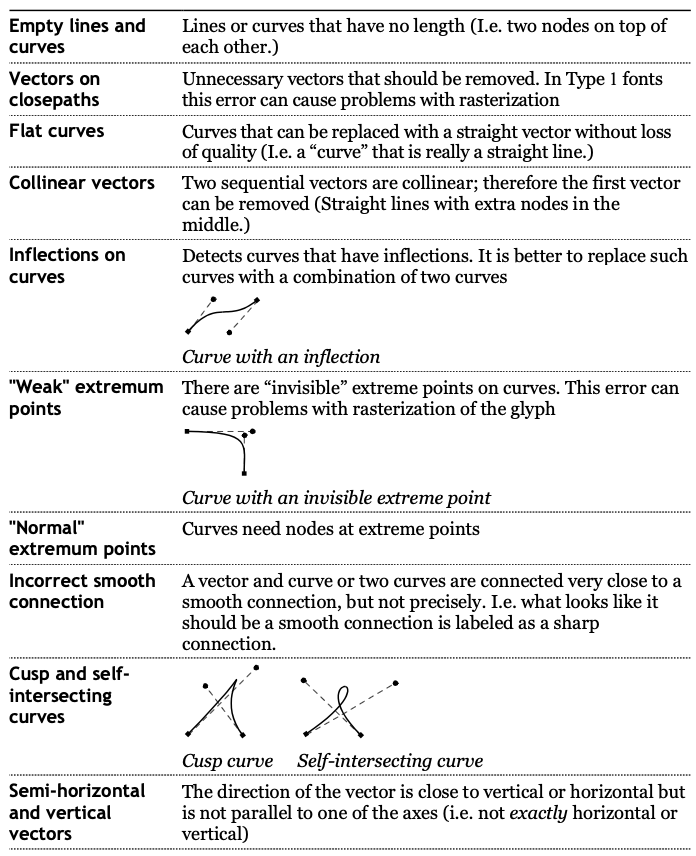
I’m new to typography and exploring the Glyphs app. I’ve installed the “Red Arrows” plugin which helps point out outline errors and inconsistencies in shapes such as Inflection, Semi-vertical handle, Extremum relevant for handle, Handle outside bounding box, Extremum, Not quite smooth connection and so on. However, is there a detailed tutorial or guide for the “Red Arrows” plugin that explains what each error means and how to fix it?
Thanks, George, for sharing the article. It’s quite helpful. It would be great if the plugin developer could someday provide a detailed guide explaining each error and its possible fixes. That would be especially helpful for beginners like me.
Red Arrows is based on FontLab Studio 5’s “FontAudit”. This is an excerpt from the FontLab manual which describes the different kinds of technical error.