I would find it very nice to have it in the software as default—instead of having to download a script or a plug-in that can eventually crash with updates.
edit to clarify: a shortcut to @mekkablue ’s tunnify script (or similar) works great. I also know very well the other tools that achieve the same result. I am merely thinking of what could be part of the software as default, and what could come with scripts and plug-in—as a user feedback, who also teaches how to use GlyphsApp to their students.
Main tools balancing handles:
Mekkablue > Paths > Tunnify
Jens Kutílek > Outlines > CurveEQ: balance handles (the best one imo)
I use it all the time whether for me or for clients. Create a curve? balance handles. Modify the tension of the curve? balance handles. It is great to avoid potential bumps when converting to quadratic. I thought it was part of a type design hygiene. You don’t use it?
I actually made a shortcut for Tunnify, because the fast script sidebar made Glyphs crash more times that I could count. Hence my point that it should be a default command
Yes, and it crashed several times already in the past. Also, very annoying that we have to select the tool, then select the outline, and then right clic “balance handles”, and then go back to the select tool. @etunni my point is that no script or plug in should be necessary to such basic command. I didn’t think that this suggestion would result in listing more scripts and plug-ins
No, I don’t use Tunnify. I use Fit Curve and Green Harmony. Much better control, I have balanced handles and smooth transitions right away, and I don’t need to post-correct it anymore.
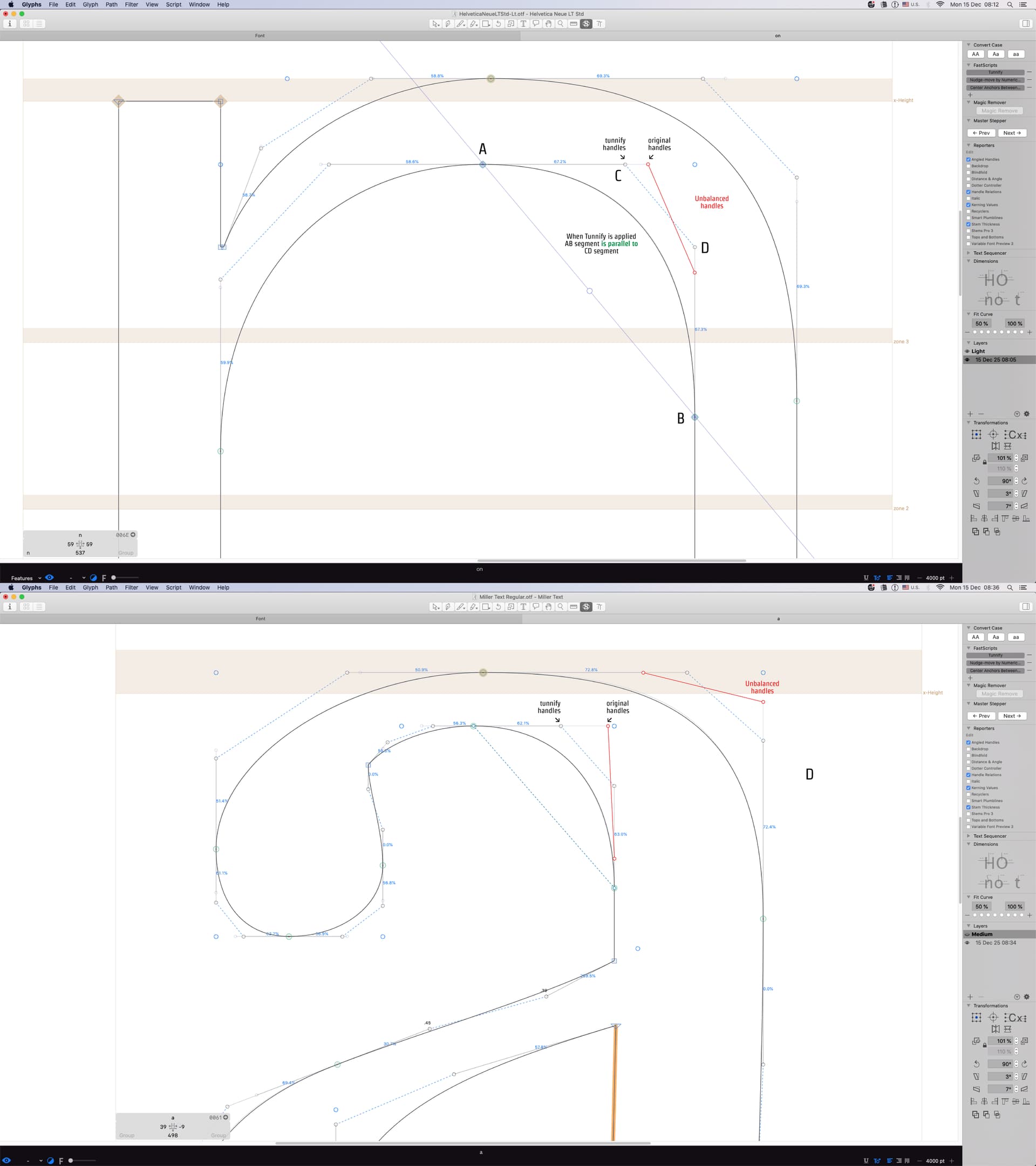
BTW the Tunnify script does not balance handles (Fit Curve does). It makes a slight redistribution towards balanced handles but keeps the shape as much as possible. You could say it makes them less imbalanced. I don’t consider it a basic function myself, it’s for fixing one specific kind of drawing style (mostly paths from Illustrator or Fontlab) without changing the shape too much.
The downside is that Tunnify does not help with harmonizing transitions. It really is a small fix-up for bad paths.
IIRC I kicked the script out at one point and someone complained😁 that’s why it’s still there. But it’s pretty much abandoned in its current state. Having said that m, I do have a new algorithm for the redistribution of handles that tries to make minimal changes, less than Tunnify would do now, but would also consider transitions.
Rainer, didn’t you mean (or forgot to mention) Grey Harmony? AFAIK Green Harmony might alter the shape even more by pushing oncurves around. I’m just curious.
For harmonizing curved, I use the RMX tools. Here I am really just talking about balancing the handles without modifying the curve tension. I am (obviously) not allowed to change what the curve looks like in a client’s design. (And I know that sometimes the balancing handles tools change the curve, but in that case imo it indicates the curve needs a fix, or some kind of compromise to find.)
Maybe I am just too old and work totally in a one-person world
My typical pattern is to go back and forth between Harmonizer and Tunnify until both seem happy, and then adjust by eye if I have a problem. Of course, I only deal with curves I have drawn from scratch, so I have no clients to please