Dezcom
October 4, 2025, 6:33pm
1
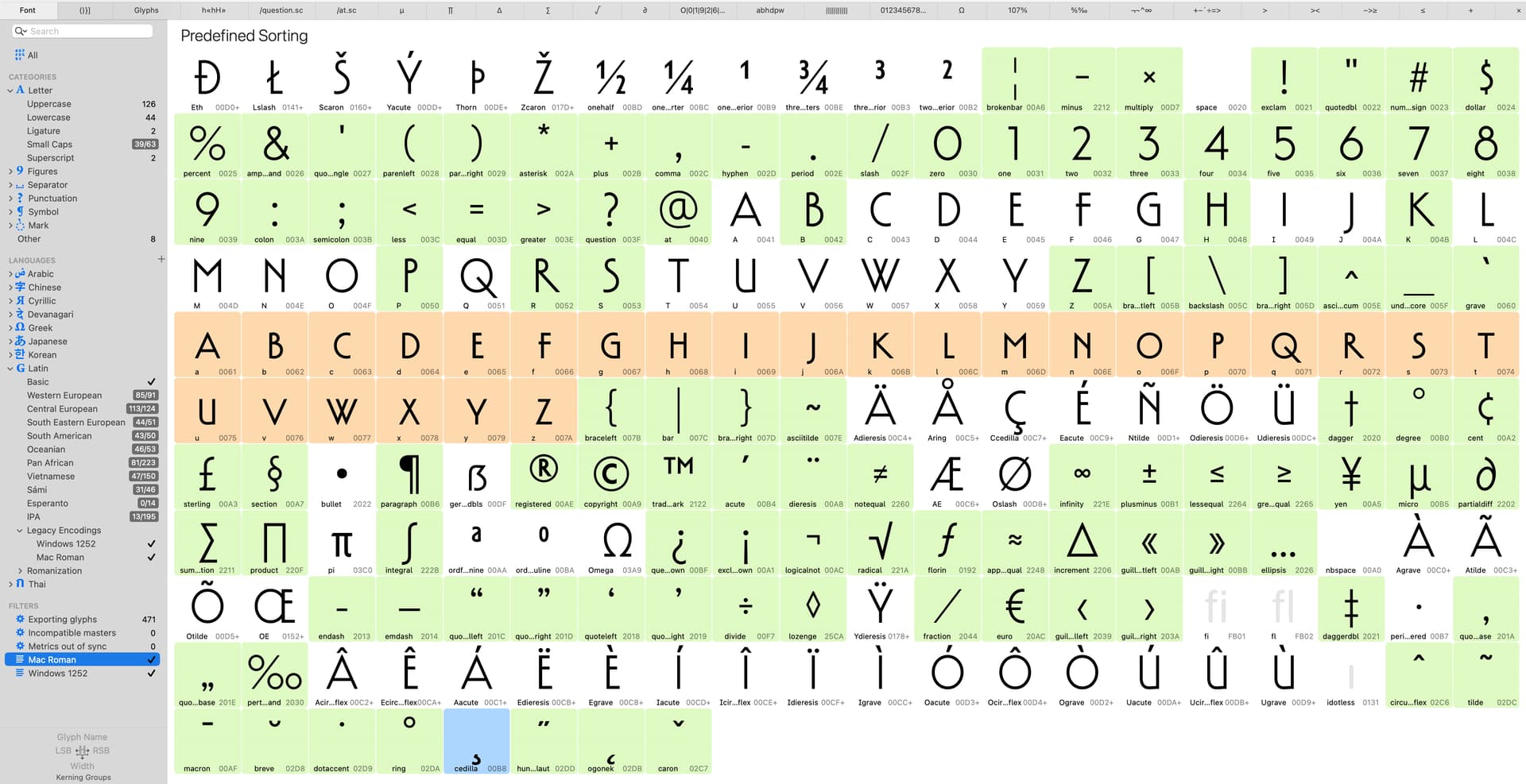
The generate glyphs feature via the language settings bar is wonky. It does nor show the glyphs that are not present in the Mac sort window. The caps show, but most lowercase does not.
If I control-click on the numbers, only the uppercase appears so no lowercase is generated.
The uppercase have double encoded the lowercase unicodes, too. You can see the “plus” next tho the unicode in the font view.
Dezcom
October 4, 2025, 10:49pm
3
How do I fix that? and how did I do that to begin with?
SCarewe
October 5, 2025, 8:05am
4
Select the glyphs in question and run Glyph > Update Glyph Info.
1 Like
Dezcom
October 5, 2025, 2:50pm
5
Thanks, Sebastian! Not sure which those might be but I will give it a go
Dezcom
October 5, 2025, 2:56pm
6
I tried that, but nothing changed. All the + signs are still there.
SCarewe
October 5, 2025, 3:24pm
7
Ah, I see. You’ll have to generate glyphs like aacute in order for Aacute not to be automatically encoded double.
1 Like
Dezcom
October 5, 2025, 6:38pm
9
The only way I could get it to work was to trash all the composite glyphs and then rebuild them. I am good now.