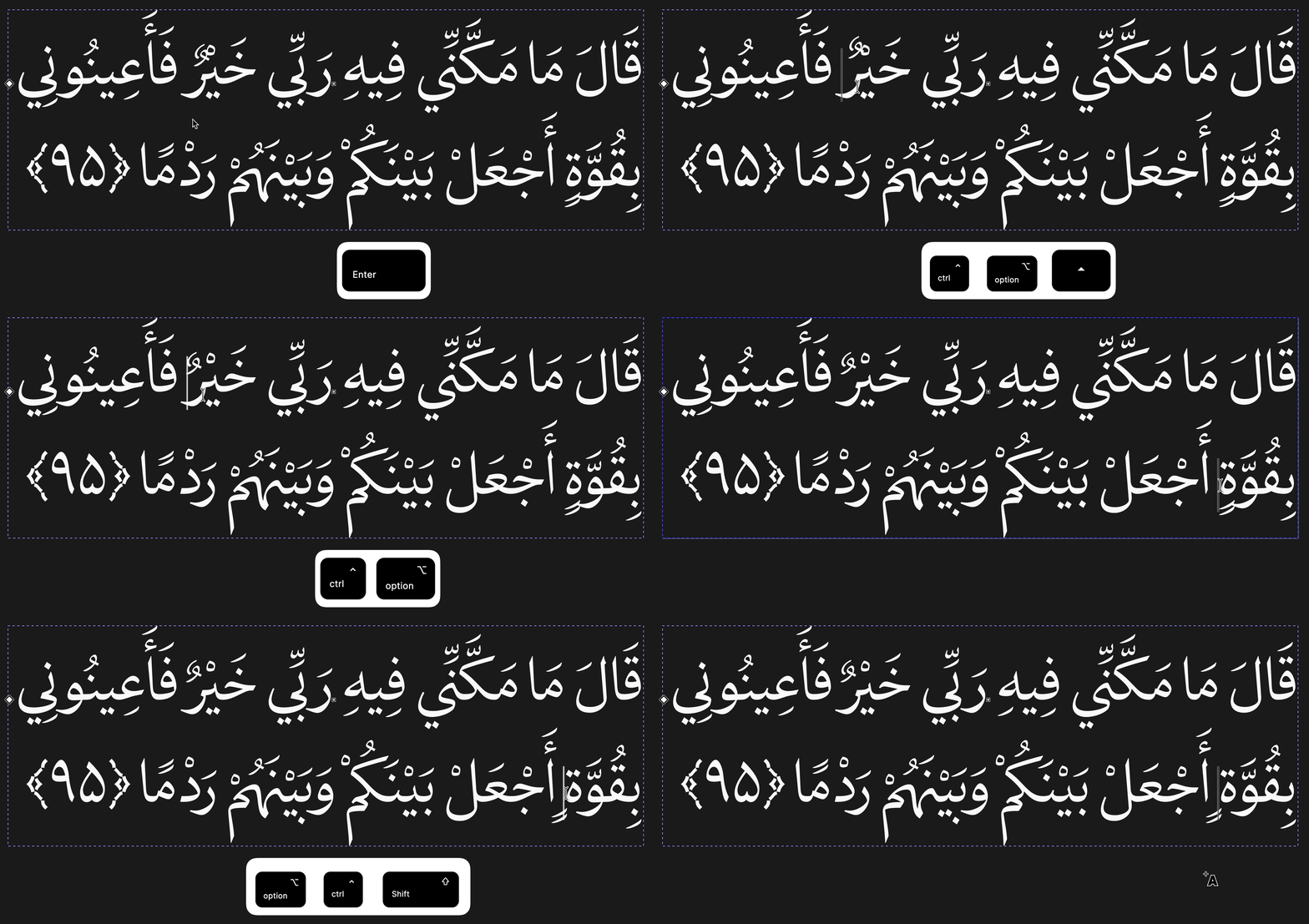
Marktune, small utility for fixing Arabic mark collisions

Marktune-v0.2.0

Marktune is a small utility for fixing Arabic mark collisions in fonts.
In Arabic fonts combining marks (fatha, damma, sukun, etc.) can visually overlap(especially in Quranic phrases). Marktune inserts special control characters, mapped in the font as positional offsets, at the text caret via configurable global hotkeys, shifting mark placement. (A CGJ(Combining Grapheme Joiner) is also inserted between these control characters, to bypass AMTRA.)

Key points:

  • Cross-platform: macOS and Windows
  • Hotkeys and codepoints are configured via a simple config.json
  • Runs from the system tray, with a quick enable/disable toggle
  • Core cluster parsing/serialization logic is written in Rust and is platform-independent
  • No interference with text shaping at all, the whole process is designed to be very lightweight and generally predictable everywhere.

Marktune is free and open-source, under the MIT license:

The project tree also includes a font-integration folder, containing a Python script with accompanying bash and batch files to generate the proper mkmk feature easily, plus a Glyphs file with the control characters ready to be copied. By following simple steps, any font can be compatible with Marktune.(For older fonts, we may in the future look into injecting the mkmk feature and control characters at a lower level, using tools such as ttx, as a post-process step.)

Using a decomposed structure, it’s also possible to shift a glyph’s dots independently of its marks. This has been tested and works, but a dedicated set of shortcuts entry isn’t implemented in Marktune yet.

This project was built with the help of AI tools (Claude and ChatGPT), used for coding assistance throughout development.

(There are more technical and practical details in the repo.)

2 Likes

The approach of using dedicated control characters for mark positioning is interesting, especially for Arabic text where stacked diacritics can become difficult to manage with ordinary font anchors alone.

One thing I’m curious about is how the modified text behaves outside the font it was designed for.

Since Marktune inserts additional characters into the underlying Unicode sequence, I’d expect the text to remain dependent on the custom font for its intended visual positioning. Copying the same sequence into another application, or displaying it with a different font, might produce a different result even if the original Arabic letters and marks are preserved.

I’m also wondering how the inserted CGJ interacts with normalization and text comparison. CGJ is particularly interesting because it can affect canonical reordering without contributing a visible glyph of its own.

For testing, it might be useful to compare the original and modified sequences in three situations:

  1. Rendering with the Marktune-compatible font.

  2. Rendering with a regular Arabic font that doesn’t recognize the custom control characters.

  3. Applying NFC normalization and comparing the resulting code-point sequences.

That could help distinguish improvements in glyph positioning from changes to the underlying text representation.

There’s a related discussion of anchors, GPOS and mark-to-mark attachment in Combining Mark Placement in Fonts. It covers some of the reasons a valid Unicode sequence can still render incorrectly depending on the font and shaping engine.

I think the interesting question is whether the adjusted text should be treated as a portable text representation or as a font-specific presentation format. Both approaches can be useful, but they have different implications for searching, copying and long-term text storage.

1 Like

Thank you for the thoughtful questions. Let me clarify a few points about how Marktune works.

A font needs the following to support Marktune:

- Two Arabic mark groups: “topMarks” and “bottomMarks”.

- Eight control glyphs: “TMX”, “TMY”, “TMNX”, “TMNY”, “BMX”, “BMY”, “BMNX”, and “BMNY”.

These are mapped to less commonly used Arabic combining marks in Unicode. The naming convention is:

  • T = Top, B = Bottom

  • N = Negative

  • X = Horizontal direction, Y = Vertical direction

The control character lists are customizable.

- A “mkmk” feature to handle the mark positioning.

All of this is explained in the “font-integration” folder of the Marktune repository, including the tools needed to generate the “mkmk” feature.

Regarding compatibility with other fonts:

The control characters are existing Unicode Arabic combining marks, rather than private-use or newly invented characters. I chose them because they don’t interrupt the cursive joining of Arabic letters, while providing suitable codepoints for this purpose.

Of course, a font needs to support these codepoints and the corresponding positioning rules to produce the intended result. When switching to another font, the control characters remain in the text. If that font supports them, they may appear using their ordinary glyph designs rather than functioning as positioning controls. Otherwise, they may appear as missing glyphs.

So yes, the intended visual result is font-dependent, even though the original letters and combining marks are preserved.

Regarding CGJ and normalization:

You’re right that CGJ has an interesting relationship with canonical reordering. I should clarify its role in Marktune.

CGJ is inserted between the control characters to prevent AMTRA (Arabic Mark Transient Reordering Algorithm) from reordering them.

CGJ has a canonical combining class of zero, so it blocks canonical reordering across its position. It doesn’t change the normalization process itself, but it does affect its result by preserving the intended order of the surrounding combining marks. This is also why CGJ is useful here: it allows us to bypass AMTRA’s default reordering when necessary.