Your fill looks good.
1 Like
The Library font folder is prone to causing cache issues. I would advise installing to Adobe fonts folder or make sure to export with different family name each time (like date & time).
1 Like
Adobe font file folder created. This now seems to work in InDesign.
However, in Illustrator, all previews are red, and the font appears red regardless of which variant is selected. If I drag it, I can see the correct color momentarily (purple in the black box, where I am dragging to the right), but it “snaps” back under the red version:
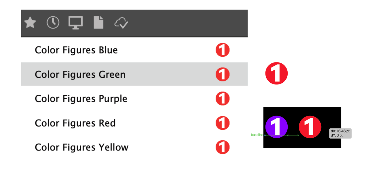
I assume restarting & clearing caches (Mac) may help resolve this?
when the fonts where in the system fonts folder, you need to make sure it is properly removed. Better change the font name to be sure.
Thanks - yes, it’s been removed completely.
can you export it with a different name and only put the purple font in the Adobe Font folder?