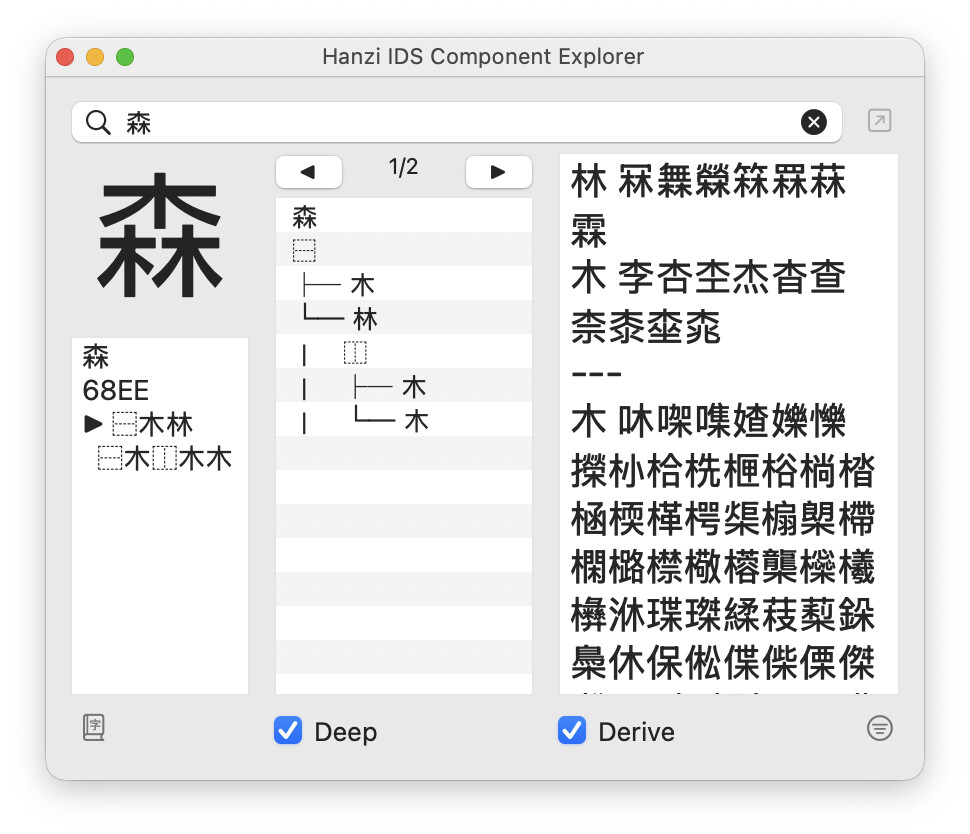
While Glyphs handles the visual outlines perfectly, I needed a way to see the “Logical Tree” of a character. This tool parses IDS (Ideographic Description Sequence) data to do two things:
Tree Visualization: Decomposes a character into a nested hierarchy.
Reverse Lookup: Finds all characters that share a specific component (e.g., querying 木 lists all related characters).
Hi everyone — a small but genuinely useful update to the IDS plugin I shared here a while ago.
You can now search by multiple components at once. Type 氵木 and it finds every character that contains both of them.
Two details make it more than a plain filter:
It matches recursively. 淋 (⿰氵林) still counts — 木 is nested inside 林. You don’t need to know the exact decomposition; if the component is in there at any depth, the character shows up.
A repeated component means “at least N.” 木木 finds characters built from two or more 木 (林, 森, …).
Why I needed it: when drawing a CJK typeface I often want to see every character that shares a particular pair of components, to check I’ve handled them consistently — and most characters share more than one. This pulls up exactly that set. (With stroke filtering on, the baseline becomes the components’ combined stroke count, so 氵木 filters around 7 strokes.)