I had the brilliant idea for a font I’m working on that I want the option of having a line over everything after a √ sign. One way to do it would be to provide every glyph without and with an overline to line up with the √, but I’d rather not do that if I can avoid it.
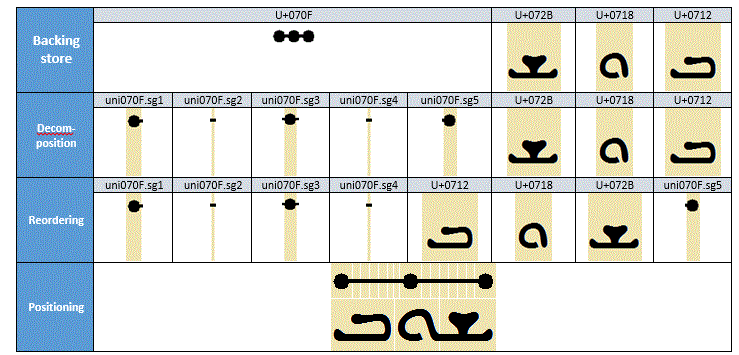
Looking through the OpenType features, I get the impression that the only other way to make this work properly would be to use the stch or Stretching Glyph Decomposition feature. However, reading up on its explanation at Microsoft and an example I can’t make it work.
What I did is have a character radical, one radical2 that’s basically the same without any part of the overline, radicaloverline and radicalterminal to form the middle part (that should be stretched) respectively the end that — per the description and example — should be moved to the end.
If I read this example right:
… all I’d need to do would be to make a substitution rule like this:
sub radical by radical2 radicaloverline radicalterminal;
But that doesn’t work. All it does is substitute the √ by the three others, making — basically — √ again, just with a little tail on it that’s the radicalterminal. Any other characters come after this instead of being displayed under the stretched overline.
Trying:
sub radical' @digits by radical2 radicaloverline radicalterminal;
… doesn’t work either, and in fact is exactly the same in effect as the previous.
Does Glyphs not support this in the preview, or am I doing it wrong?
The OpenType preview in the edit view in Glyphs is very limited (some things are not implemented on purpose, others didn’t come up yet). So you need to test outside of Glyphs. e.g. in FontGoggles or fontgauntlet.com.
Probably you need to make your overline glyph a mark; position it at the height where it clears your digits and you won’t need any additional adjustment. Replace the initial radical by the one without the tail, then each digit with digit+mark, and after the last one add the end tail.
EDIT: Or if you can get the stretch to work, sub only one. Either way it probably needs to be set to type Mark.
Thanks for the tip. I just tried it in fontgauntlet, but it also doesn’t work there. I’m probably doing something wrong, but as I can’t find any more examples of somebody actually usingstch, I’m having a hard time figuring out what.
(Also, I ran into the additional problem that InDesign doesn’t support stch, which I failed to consider.)
I knew I forgot to mention a third way I had thought of This has two problems, IMHO: one is that it will need lines of different widths, else it will be too wide for some glyphs and too narrow for others. The second is that I don’t want to be entering marks for each character, I want to be able to switch on a feature that automatically adds the line to all selected text.
One solution to that second thing is to do sub @narrowglyphs by @narrowglyphs narrowoverline; etc., but that is a lot of manual work setting up the substitution rules. I very much favour automating things if I can Which is how I ended up at stch as it seems to be intended for exactly this kind of problem, even if it was probably designed specifically for Syriac fonts (given that that’s the only example Microsoft uses). But it’s starting to look like substituting individual glyphs with glyph+overline will be the way to go.
In HarfBuzz you can make it work for any Arabic symbol (since Syriac and Arabic use the same shaper internally in HarfBuzz), but it does not work for, say, Latin. See the test font in Supporting `stch` for Arabic subtending marks · Issue #4369 · harfbuzz/harfbuzz · GitHub. The test font seems to work with Apple’s Core Text as well, but not Microsoft’s Uniscribe.
I would be surprised if it didn’t OTOH, for some reason I can’t comprehend, “they” changed OpenType so that things like terminal forms (fina) don’t work unless the script has “joining behavior”. Why? It’s not as if it can only ever have a use for those — there’s all kinds of creative things you could do with it, but you suddenly can’t anymore.
That’s exactly the same method that I tried too. I suspect it’s a combination of me wanting to use it with the “wrong” writing system and the software not supporting it.
OK, it’s been a while but I finally got round to making this work, though not with stch. What I did was make overlines with widths that are multiples of 100, but a glyph width of 0, naming them radical100, radical200 and so on. Then I added a stylistic set with the following feature code:
@radicaloverlines = [$[name beginswith "radical" AND name endswith "0"]];
@width100 = [$[layer0.width <= 100]];
@width200 = [$[layer0.width > 100 AND layer0.width <= 200]];
# …
@width900 = [$[layer0.width > 800 AND layer0.width <= 900]];
@width1000 = [$[layer0.width > 900 AND layer0.width <= 1000]];

sub @width100' by radical100 @width100;
sub @width200' by radical200 @width200;
# …
sub @width900' by radical900 @width900;
sub @width1000' by radical1000 @width1000;
This, of course, can make the overline hang beyond the glyph by up to 100 units, but I don’t think this is a big deal, and anyway, it’s easy enough to solve should it prove to be by just adding in-between lengths of overline and the necessary lines of code to deal with those.
Added bonus: in InDesign, a GREP style of (?<=√).+?~h will apply this from √ to the first End Nested Style Here that comes after it, so all you (or at least, I ) will have to do is type the latter at the end of the root.
 This has two problems, IMHO: one is that it will need lines of different widths, else it will be too wide for some glyphs and too narrow for others. The second is that I don’t want to be entering marks for each character, I want to be able to switch on a feature that automatically adds the line to all selected text.

 Thanks for figuring that out, though