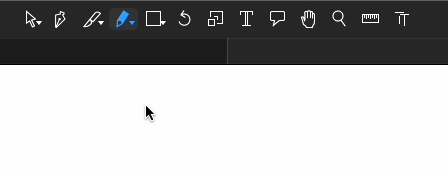
When I select the Pencil tool, its cursor icon is correct (pencil), and if I start to draw immediately, it’s fine. But when I just move the mouse, the cursor icon changes back to Select tool icon and stay like that until I will select the Pencil tool in the next time. Is it just me or is it a bug?
Version 3.4.1 (3436)
macOS Sequoia 15.6.1
that is a but. I’ll look into it.
Thanks. Also, I have a side question. In a plugin, I need to check if Pencil tool is active. Currently it’s identified like this:
if Glyphs.font.tool == "GSToolGroup":
Is GSToolGroup a correct name for Pencil tool? It feels a little generic comparing to the other tools names.
The tool group is handling the stacking of tools in one button. I fixed the accessor to return the actual tool.
1 Like
Thanks for the update (3500). Here are the reports.
Pencil cursor — works but with initial confusion
- When I select the Pencil or Draw tool, manually from the panel, and start moving the mouse, the cursor displays correctly.
- However, initially, when I just select any tool (different of Select tool) by pressing the key like
P for Draw or B for Pencil, the cursor temporary blink with the selected tool for a moment, but then it display the default arrow cursor again, until I start moving the mouse. It is noticeable only when I select the tool by pressing the key assigned to it.
Tool identification — completely fails now
Identical error from Console and from any Reporter plugin:
print(Glyphs.font.tool)

  File "GlyphsApp/GlyphsApp/__init__.py", line 4981, in <lambda>
  File "GlyphsApp/GlyphsApp/__init__.py", line 4961, in __GSFont_tool__
UnboundLocalError: cannot access local variable 'toolClassName' where it is not associated with a value
Thanks for the report. Fixed it.
Thanks, the tool identification works fine now. I guess that to support both new and old name of Pencil tool in different versions of Glyphs, I need to identify it like this:
active_tool = Glyphs.font.tool
if active_tool in ('PenTool', 'GSToolGroup'):
	# Pencil tool is active