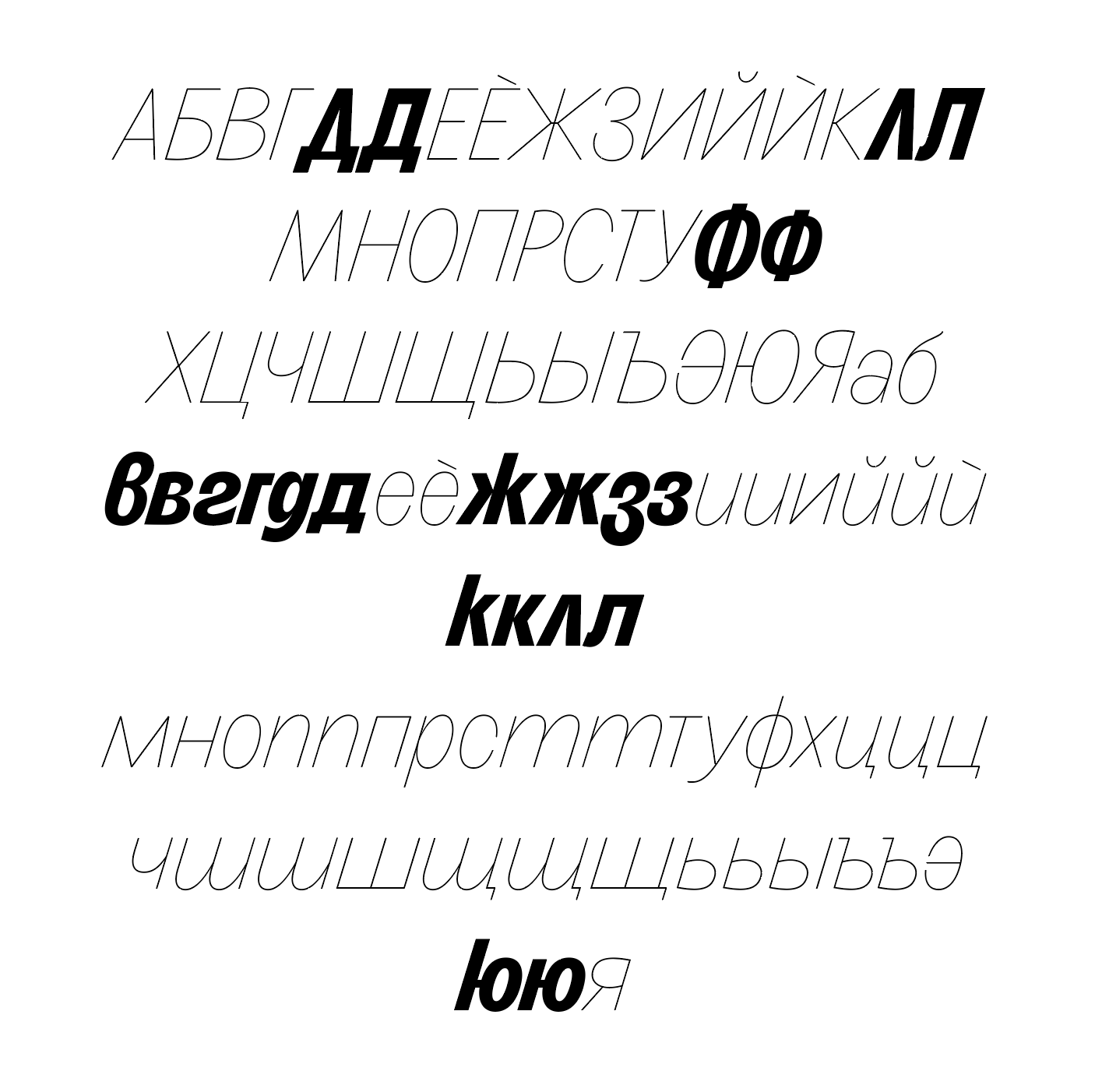
Hi,
It’s my first time designing the Bulgarian Cyrillic glyphs and I’m having trouble exporting font files that work in Adobe Illustrator. The files are exporting but not working correctly inside Illustrator.
After selecting a weight, some glyphs would jump on a different weight, like this.
Can someone take a look please? Thank you!
Side note: the bottom bar in your De-cy.loclBGR looks very slim, I would recommend optically aligning it with the descender thickness (or the bar in De-cy).
Hi Sebastian, thank you for your reply and feedback.
I do export the fonts directly into the Adobe Fonts folder. The fonts do refresh after exporting… The issue is that all weights would “fallback” to the bold for those specific glyphs. I don’t understand why.
Are you adding them from the glyphs palette? Access them through OT features instead. To keep things fun, I think illustrator hides language localization somewhere in paragraph styles.
I did make the text by adding them from the Glyphs Palette. The problem is that future customers won’t be too savvy either so this needs to work either way.
I believe you’re right. I just took the unicode from a different typeface and added it to my file and it worked. So maybe the bigger issue is that Glyphs doesn’t know how to correctly map these glyphs to the correct unicodes.
I understand now. Because I added these glyphs from the Bulgarian Language panel and not the Basic Cyrillic panel, they were added as “alternates” instead. So because of that Illustrator has no idea how to deal with them.
The only OpenType feature you need to “apply” is setting the language of the text block to Bulgarian. People will do this anyway when writing Bulgarian, for things like spell checking, hyphenation and, indeed, localisation of shapes.
I believe Illustrator is pretty bad with that. But maybe it has gotten better.
IIRC InDesign does a better job at reconstructing the opentype feature when you insert from the glyph palette. Make sure you update your features and that locl is mentioned in aalt.