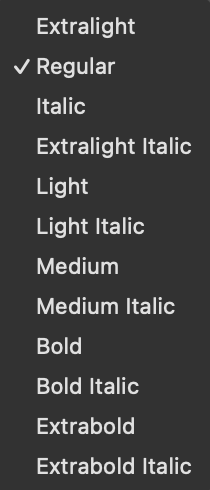
Regular and Italic instances missing from macOS font menus (Variable Font, two files, wght only)

I’m exporting two variable fonts (Roman + Italic) from separate .glyphs files of the same family using the Better VF Export plugin. Both files have only a wght axis.

The problem: In macOS apps like TextEdit and Pages, every instance shows up except Regular and Italic. The font has only two masters (Thin and Black), neither of which is anywhere near a Regular weight. Because the Variable Font Origin is set to the lightest master, the name table ends up with “Extralight” baked into nameID 1, 4, and 17.

I managed to get Regular and Italic to appear by post-processing with fonttools — rebasing the fvar default to wght=400, fixing the name table, and rebuilding the STAT table. All instances now show. However, style linking is still broken:

Regular    → B → Bold (back and forth) ✓
Regular    → I → Extralight Italic → I → Extralight
Italic     → B → Bold Italic (back and forth) ✓
Italic     → I → Extralight
Extralight → B → Bold → B → Regular
Light      → I → Extralight Italic → I → Extralight
Medium     → I → Medium Italic (back and forth) ✓
Bold       → I → Bold Italic (back and forth) ✓

So Bold ↔ Regular and the heavier weights (Medium, Bold, Extrabold) correctly link to their italic counterparts. But the italic button on Regular, Light, and Extralight all collapse to Extralight Italic, and Extralight doesn’t bold to Extrabold as you’d expect.

InDesign and Figma on Mac show all instances correctly, grouped by Roman then Italic.

On Windows in Notepad, all styles appear but without the “Italic” label — each weight name shows up twice (Extralight, Extralight, Light, Light, Regular, Regular, …). The Bold and Italic buttons do work correctly though.

I’ve tried both with and without an ital axis declared in the STAT table of each file. I’ve read through the plugin documentation and searched the forum extensively but can’t crack it.

My question: What is the correct way to set up two variable fonts (Roman + Italic, wght axis only) so that all instances appear in macOS font menus with proper style linking — especially when the VF origin isn’t at a Regular weight? Is there something I should be configuring differently in Glyphs itself so the export is correct without post-processing?

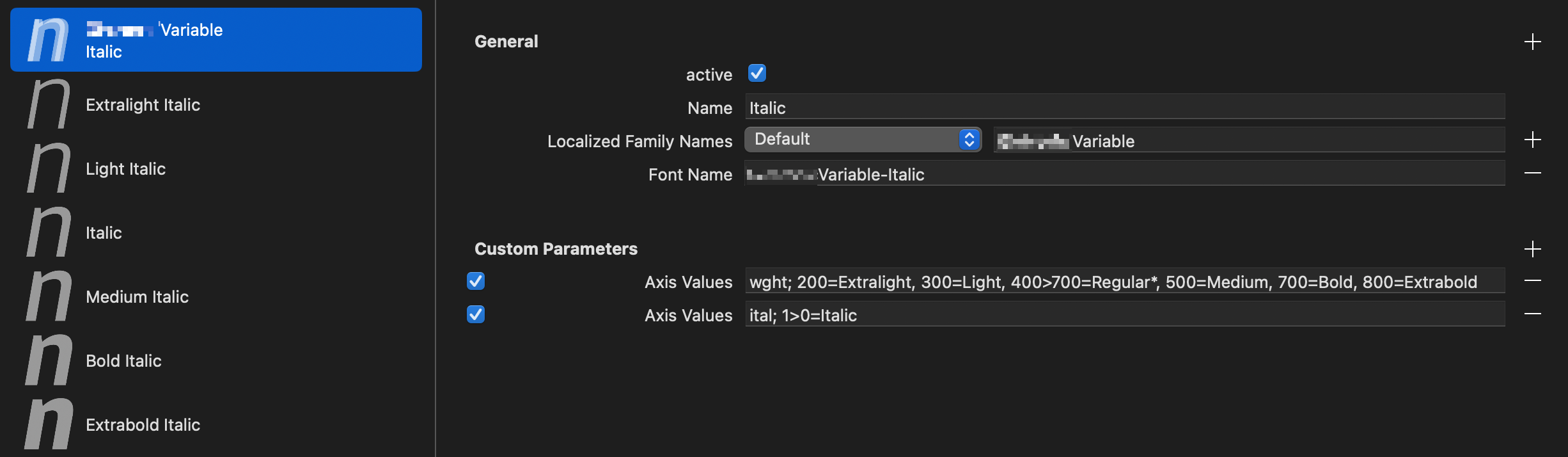
  1. The Italic’s Axis Value for the ital axis should be: ital; 1=Italic. STyle linking should only ever be entered from the normal axis position towards the non-normal, never the other way around.
  2. Don’t use Font Name for variable fonts, but rather variationsPostScriptNamePrefix a.k.a. Variable PostScript Name Prefix. It is the PS Name part before the hyphen, and it must be unique per file, so ASCII only, but no spaces and no hyphens. Glyphs will then correctly calculate the PS Name. The OTVAR Maker script will help you with this.
1 Like

Oh? I can’t do:

MyFontVF-Regular
MyFontVF-Italic

?

I do this and it makes roman and italic instances of a VF appear under the same family name. I haven’t encountered any issues. What’s the reasoning behind having a different prefix per file?

Many thanks!

Fair enough, seems to work. I just thought I need to link back to the roman, as this is what is done in static instances when checking the “is the Italic of Regular” box.

I removed the Font Name Parameter and used the OTVAR Maker to propose the Variable PostScript Name Prefix CP values. Going with MynameVFRoman and MynameVFItalic the fonts won’t install properly now though, not showing up in any mac app, nor Figma or ID.

New Question: How can we avoid that the filenames get the the duplicated VF?
I get MynameVF-ItalicVF.ttf and MynameVFVF.ttf, where the second VF is okay, as defined in the variable instance, but the first one is still from the GlyphsApp default vf export. I think there was a custom Parameter, but I would prefer to not have that at all, globally for any font.

Seconding Sebastian’s question(s) :slight_smile:

Font cache clearing and restarting the Mac helped (I know, I know)

BUT I still have the same issues, partially even worse:

  • All style linkings work, except for when italicizing Light it switches to Extralight Italic and then back to Extralight when un-italicizing.
  • It shows `Extralight before anything. I know this is the variable font origin. Is there no other way to avoid this – when a font only has 2 masters – other than resetting the origin via fonttools?
  • I also dislike that the name table still shows the “Extralight” in some family names like IDs 1, 3, 4 and 6.

As a side effect when selecting any style of the font in the Terminal, it shows the “Extralight” as part of the Family Name.
For example selecting
Myfont VF > Extralight Italic
it shows
Myfont Extralight Extralight Italic Italic 13
in the settings window – which makes it appear like a very buggy thing.

Also listing the installed font includes that annoying Extralight in the family name:

fc-list | grep -i Myname | sort

...MynameVF-ItalicVF.ttf: Myname VF,Myname VF Extralight
...MynameVF-ItalicVF.ttf: Myname VF,Myname VF Extralight:style=Bold Italic
...MynameVF-ItalicVF.ttf: Myname VF,Myname VF Extralight:style=Extrabold Italic
...MynameVF-ItalicVF.ttf: Myname VF,Myname VF Extralight:style=Extralight Italic,Italic
...MynameVF-ItalicVF.ttf: Myname VF,Myname VF Extralight:style=Italic
...MynameVF-ItalicVF.ttf: Myname VF,Myname VF Extralight:style=Light Italic
...MynameVF-ItalicVF.ttf: Myname VF,Myname VF Extralight:style=Medium Italic
...MynameVFVF.ttf: Myname VF,Myname VF Extralight
...MynameVFVF.ttf: Myname VF,Myname VF Extralight:style=Bold
...MynameVFVF.ttf: Myname VF,Myname VF Extralight:style=Extrabold
...MynameVFVF.ttf: Myname VF,Myname VF Extralight:style=Extralight,Regular
...MynameVFVF.ttf: Myname VF,Myname VF Extralight:style=Light
...MynameVFVF.ttf: Myname VF,Myname VF Extralight:style=Medium
...MynameVFVF.ttf: Myname VF,Myname VF Extralight:style=Regular

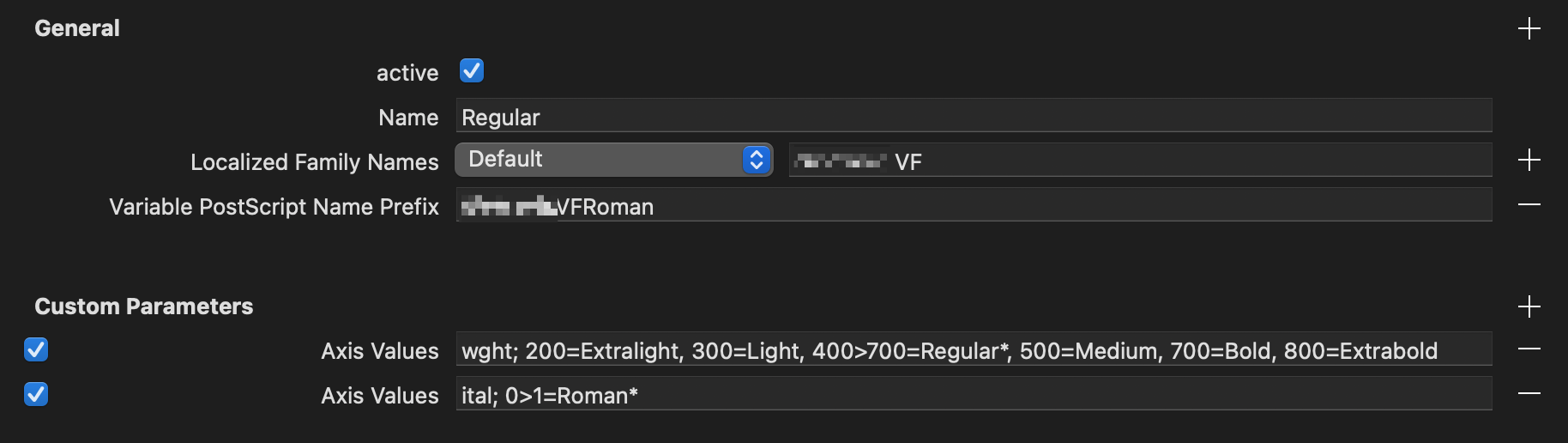
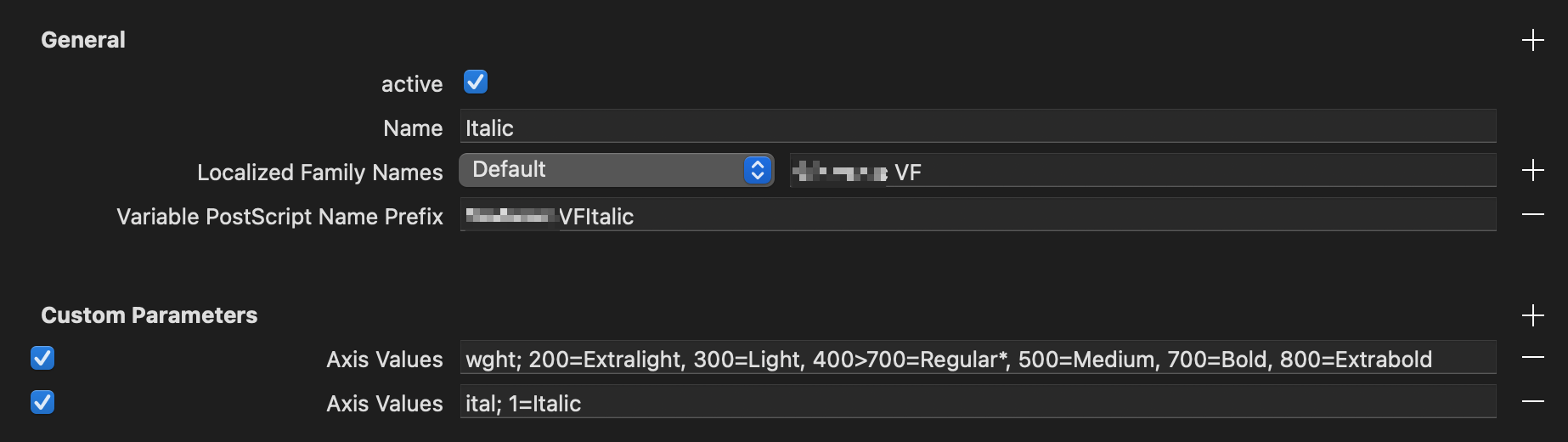
Here are the current settings

Roman:

Italic:

I just found that the upright font had the isFixedPitch CP, but it was disabled. Its a monospace font.

With this corrected, the order of the styles in the menu is good now (with only Regular and Italic first, and then all the other in expected order), good. I also added a
Localized Family Names Default
and
Full Names Default

With the same family name as value in both font files. Not sure if that helps anything.

The issues and questions remain:

  1. The Extralight in the Name Tables
  2. Style linking is still broken with “Extralight”
    Light → I → Extralight Italic → I → Extralight
  3. The redundant VF in the exported font file names.

See above for more details about those

Anyone any ideas please?

Style.zip (9.4 KB)

Is that a screenshot from the Adobe dropdown menu?
I have 2 VFs (Upright and Italic) and they are not grouped Upright and corresponding Italic, but rather all uprights and then all Italics which is a long scroll when there are 120 instances in total.

No, it is TextEdit.

@GeorgSeifert @mekkablue sorry for tagging you, but I am really desperate here. I suspect the variable font origin to be part of the cause of this broken style linking, as it is the same style (name) as the light links to.
All I can do in post processing is moving the default to 400 and remove that annoying “Extralight” from the family names, but even though it makes things better, it does not solve the main problem.

I also still wonder how we can get glyphs to not produce that doubled “VF” in the file names. Please.

fileName = {{{fontName}}}

1 Like

Thanks, Sebastian.


Key takeways from a call and testing with Georg

IDs 1, 3, 4, 6

Here we usually end up having the style name included that sits on the Variable Font Origin. Just ignore those. Must be in the font and unique, any consuming app must not use these, and if they do, it is a bug with the app.

IDs 16, 17, 25

  • 16: same family name in both fonts
    (e.g. “Style VF” in our case)
  • 17: differing names between upright and italic
    (e.g. “Extralight”, “Extralight Italic” in our case, which is likely origin & origin italic)
    25: differing names between upright and italic
    (e.g. “StyleVFRoman”, “StyleVFItalic” in our case)

(“Style” is the test font’s familyname)

The font as in the example is basically set up correctly, though we removed some CPs that are not needed (familyNames default, postscriptFullNames default) and exported it without the Better VF Export plugin and thus ignoring the “Axis Values” CPs.

Anything odd seen in different apps are likely bugs or interpretational issues with the apps, not the font and its setup.

  • Word Mac (Office) works, though it shows Extralight and Extralight twice, but that is expected there, it always shows the origin first and then all styles, that’s just how they roll
  • InDesign Mac (latest): italics work, but bold (cmd+shift+b) goes like this:
    from any styleBBoldB → Extralight
  • TextEdit works, though here you need the typography panel to access the font.
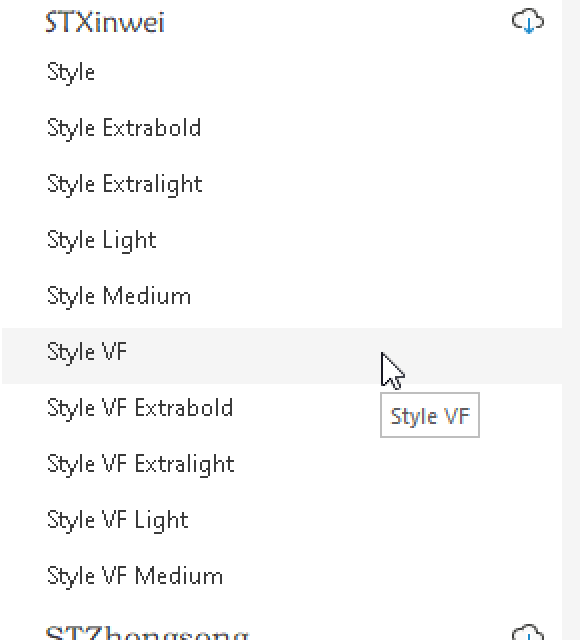
  • Windows: the order is off (alphabetically), but it works: style linked styles don’t show, which is expected here (hidden from the menu are: Bold, all italics, and Regular, which is is there but the “Regular” is elided)

Screenshot – Windows 11, Word, Static and Variable Fonts installed, test font family name “Style”

About the duplicated VF in the file name

use fileName = {{{fontName}}} as Sebastian wrote. Other things would require Glyphs to do too much guess work just for automating this. Adding the “VF” or “Var” or similar particle to the variable fonts if you also intend to ship static fonts is recommended by Rainer (I think even in a Glyphs tutorial), but not required.

A note about the filename suggestion by @SCarewe:

fileName = {{{fontName}}} creates

  • StyleVFRoman-Regular.ttf
  • StyleVFItalic-Italic.ttf

So I tend to go for
fileName = {{{variationsPostScriptNamePrefix}}}, which creates

  • StyleVFRoman.ttf
  • StyleVFItalic.ttf

(given that “Style” is the Family Name)

1 Like