Hello everyone,
I’m currently developing a Devanagari typeface in Glyphs, and all the base glyphs have been designed. We’ve run into a challenge regarding the proper placement and selection of iMatra and iiMatra variants.
We’ve designed multiple iMatra/iiMatra variants to accommodate different glyph widths and improve visual appeal. For example, I have seven iMatra variants: iMatra-deva, iMatra-deva.00, iMatra-deva.01, iMatra-deva.02, iMatra-deva.03, iMatra-deva.04, and iMatra-deva.05.
The core issue is determining how to automatically select the correct iMatra variant for a given glyph or combination of glyphs. For instance:
For a glyph like ka-deva, iMatra-deva.00 appears most visually appealing.
However, for a glyph like ja-deva, iMatra-deva.02 is the preferred variant.
My primary question is: How can I script or implement a mechanism within Glyphs to ensure that the appropriate iMatra variant is applied to specific glyphs?
I’ve attempted to use the abvs (Above-base substitutions) feature in Font Info > Features to handle some of these substitutions. Here’s an example of what I’ve tried:
lookup Abvs3_devanagari {
Sub iMatra-deva’ ta-deva by iMatra-deva.01;
} Abvs_devanagari;
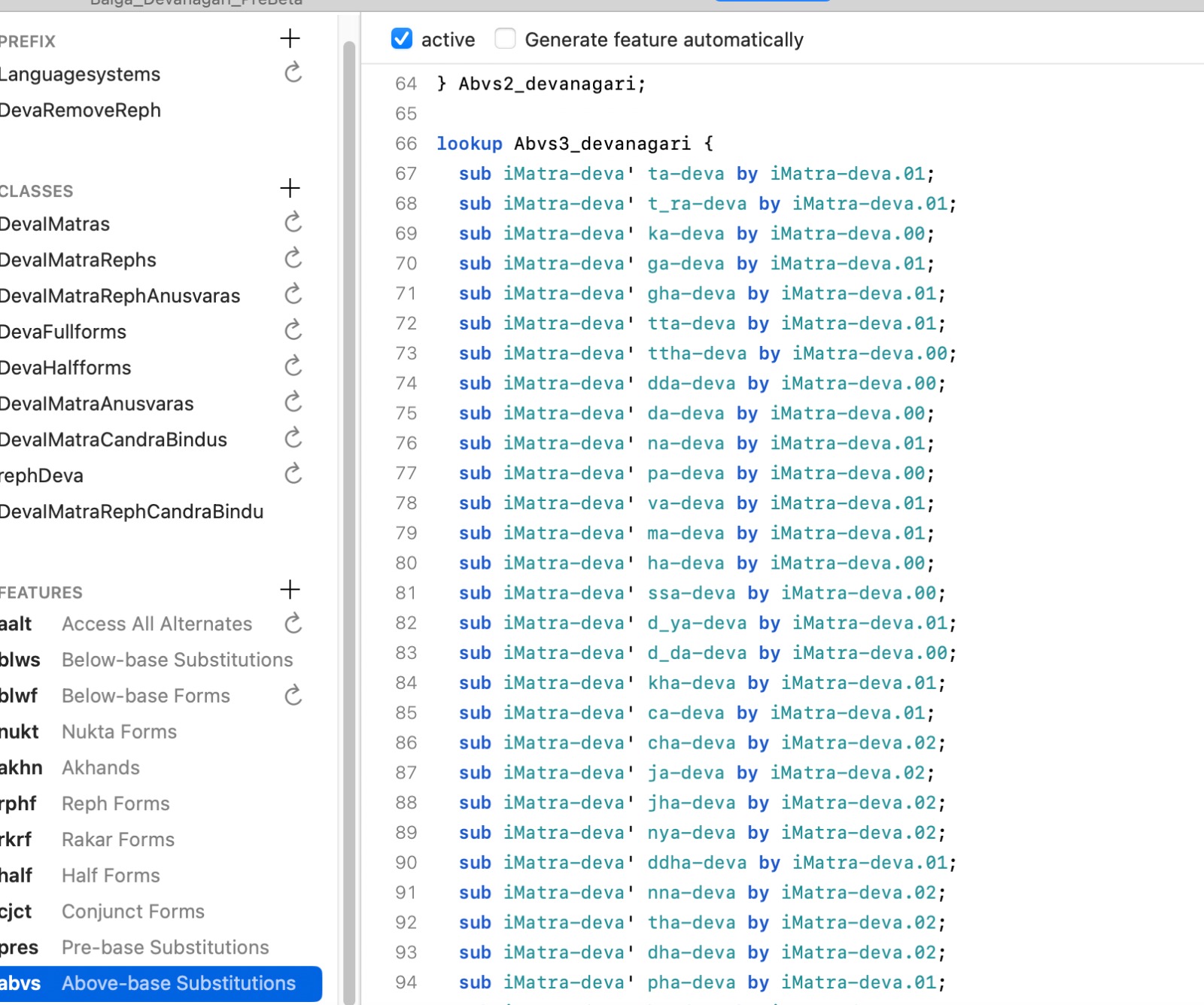
However, upon testing, I’m observing that only iMatra-deva and iMatra-deva.00 are being used, and other variations are not appearing as expected. It seems that iMatra-deva and iMatra-deva.00 are overriding or taking precedence over my specific substitutions for other variants.
Furthermore, I’m also looking for guidance on how to handle iMatra placement with conjuncts. When we have an “akhand” conjunct formed by a half-forms followed by a full-form (e.g., t-deva (half-form) + va-deva (full-form) to form त्त्व as in सात्विक), how can I script a single iMatra to correctly attach to such a combined form?
Any insights into why my abvs feature might not be working as intended, or alternative approaches (especially for more complex conditional substitutions or conjunct handling), would be greatly appreciated!
Thank you in advance for your help.