I noticed that Glyphs 4 added this modifier to the scripts menu, tied to the Alt key. It’s a good feature in certain situations, but it breaks my workflow considerably: using Raycast or Alfred or other launchers to search for menu bar items, all the scripts get effectively double entries, resulting in (in my case) over 1500 entries to index and a much slower process overall. Would it be possible to disable this Alt- modifier just for the scripts?
I have also an issue with the new “Show in Finder” alt item in scripts menu.
When I assign a keyboard shortcut to a script, the “Show ‘xxx.py’ in Finder” entry is not hidden anymore, it shows always in the menu, directly under the script. So I have every script with shortcut two times in the menu now. Without shortcut its fine, only appears with alt key like it should.
I guess the alt item dont get the same key equivalent as the main item so macOS dont treat them as pair anymore?
Glyphs 4.x (4201), macOS 26.6.2
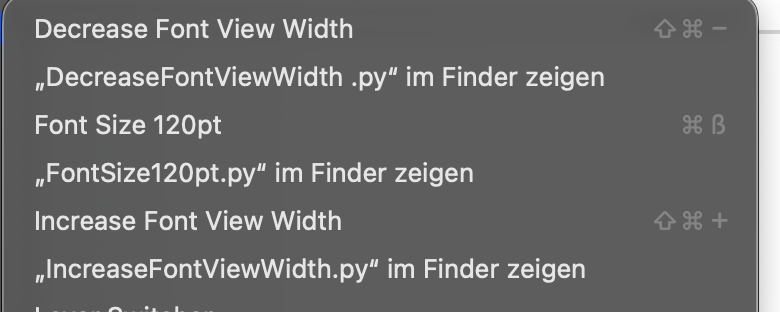
I tried to only show the “Show in Finder” item on the folders. That would reduces the extra items quite a bit and doesn’t interfere with the shortcuts. And still allows to access the scripts. But when you are in a sub-submenu and press the Option key, the submenus disappear. Opening the menu while the Option key does work. But that feels broken.
Another option would be to just open the folder when the item is clicked. That works well but is difficult to discover.
I guess adding the “Show in Finder” only to the folders could be interesting and be some sort of middle ground.
But I do think there should be a preference somewhere to disable this new Option behavior in the Scripts menu with Option (apart from the “Open Scripts Folder” / “Reload Scripts”), as it does mor harm than good for these specific workflows. all in all there’s other ways to get to the scripts, like macro window.
I have removed the “Show in Finder” items. Update is up.
1 Like
Thank you!