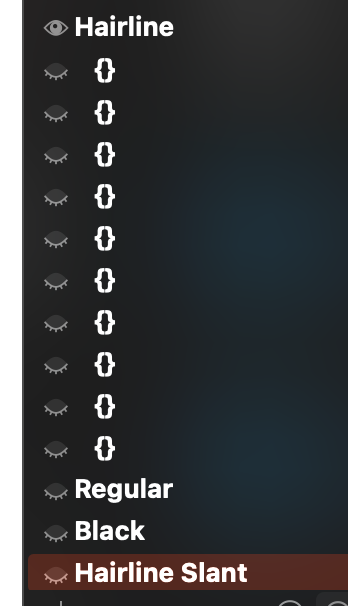
Even though I set all of them back, the smart components don’t pick on them. Even worsts, even the original smart glyph itself is not picking on the brace layers anymore.
Once I removed all Smart glyph features, all brace layers definition were gone again…
I would love to be able to use smart components in my workflow, but they have to work with brace layers to make sense. One thing that remains also unclear is if the TOP/BOTTOM of brace layers should be defined (if relevant) or if this should be only done for masters.
@bagsn has a point here. The Smart Component feature feels a bit less usable as it is now. It would be nice to know if the functionality of the intermediate layers will be included with Smart Components at some point.
The reason I ask (beside the fact that it would be nice to have it working) is because I would like to create a GUI plugin on top of the smart component feature to easily auto build things.
It can of course be done without smart components (as RMX tools does today), but the idea of having a native non-destructive, swappable and fine-tunable components is so much better that doing it all with paths.
It would be great to know if that’s something that is planned in the close future (in which case I’ll happily wait for it), or if it’s worth building my own solution (even though it won’t be as satisfying as using smart-components).
This sounds incredibly useful. Having a plugin that could fine-tune a bunch of glyphs as components in one go would be great. It would make adding superior lowercase a breeze. Also, superior/inferior figures.
Any idea? @GeorgSeifert@mekkablue ? Unless this smart component brace layer fix and batch editing idea are something you are planning for Glyphs 4? In which case I would love to know and avoid spending time building something to get your version just a few weeks later.
I don’t understand what exactly your issue is. The description is vague, so I cannot answer your question. Idea about what? What were you trying to achieve and why did you have so many brace layers to begin with? Do you want the TypeNurse script fixed or adapted to your workflow?
If I’m not mistaken, Baptist is making a plugin that uses smart components. But for the plugin to work as intended, smart components should work with intermediate layers (brace layers).
There are plenty of brace layers in the exmaple because the design of this specific glyph in this font requires 3 brace layers per master (specific to the design). I just always keep all brace layers in the same master to make things easier when using glyphlib, which makes it look like there are millions of it.
But this is totaly unrelated to the problem I’m discussin here. It just happened that I tested smart components again with this font.
The most important point here is that brace layers are not being picked up when using smart components. I woud love to use smart components and be able to build things using them, but smart components need to work with brace layers for that.
I remember it being a problem in the past too and that was the reason why I gave up on them. The perspective of having it fully working is what got me excited when I read the release page of the new 3.4 version.
So my question was, is it planned to make smart component work with brace layers? Or is it meant to stay that way for now?
Then, there is an extra bug. When adding or removing smart component parameters to a glyph that uses brace layers (which it turns out doesn’t work anyway), all the brace layers paramteres (the axes values, {value1, value2} for example) are all deleted (see screenshot). That’s quite frustrating.
I do not use _part glyphs and I am only interested in font axes for this functionality, so it would be great to have it working with brace layers!
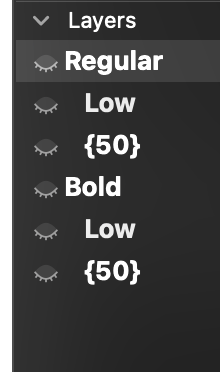
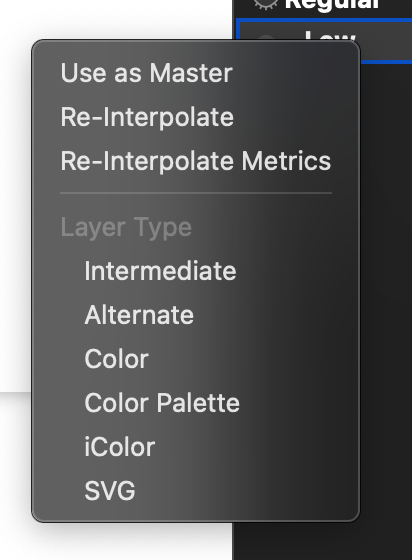
What kind of layer is Low in your example? It’s not a brace layer, it is not a master either but it is definitely a special layer. It seems like you used a brace layer as a master?
Is there any reason to have done that rather than just using brace layer?
This is a bit of a tangent and I personally never use them but these kind of layers are actually quite frustrating as they do not give access to any information about their parameters in the UI (only through the API). It would be great to have them tagged of some Layer type and be able to edit their axis settings (but that’s totally another problem).
To go back to the smart glyphs and smart components, I feel that this feature to be truly useful requires to usable/configurable using Python.
Using Smart component with a Smart Axis with _part glyphs makes total sense, but the way I would like to use this feature is to build glyphs using cross master components (aka. smart components) in multiple axis scenarios. It is not realistic to expect anyone (at least not me) to configure each glyph with the same parameters one by one.
I have been able to make it work in simple setups but it is too quickly limited by the impossibility to use brace layers (on font axis).
When you say the setup is different than with regular glyphs, what do you mean? What regular glyphs are you refering to?
And in what way could it be inferior to build the smart glyphs parameters using python rather than using the UI?
My idea is to use Smart glyphs to use trans-master components and build a tool to automate the process of building some redundant glyphs (mostly using weight, width and optical size, but not limiting it to it).
The most obvious use case being superior/inferior or ordinals, but the tool could be helpfull in many more situation too. Right now the best tool to do the job is RMX tools. It is great and I love it, but it is not visual,it is destructive (uses paths), doesn’t allow the construction of template/receipe for recuring scenarios (like sup/inf, etc.), and is limited to a set number of axis and masters.
Having a fully functionaly smart component would allow to grasp the full power of Glyphs interpolation in components.
I tried using it a few years ago for the same reason but the interpolation was quite buggy (it was picking up brace layers then, but poorly). I remember that then you told me that it was not meant to be used that way. Now the feature seems more stable but the missing piece remains the brace layers. It feels so close, it would be great to have it!
This plugin is exactly what I need. Place a smart component as a superior figure or a sc letter, scale it to size and adjust its weight with a slider! And any time you change the original glyph it automatically adjusts. I would love to test such a plugin!