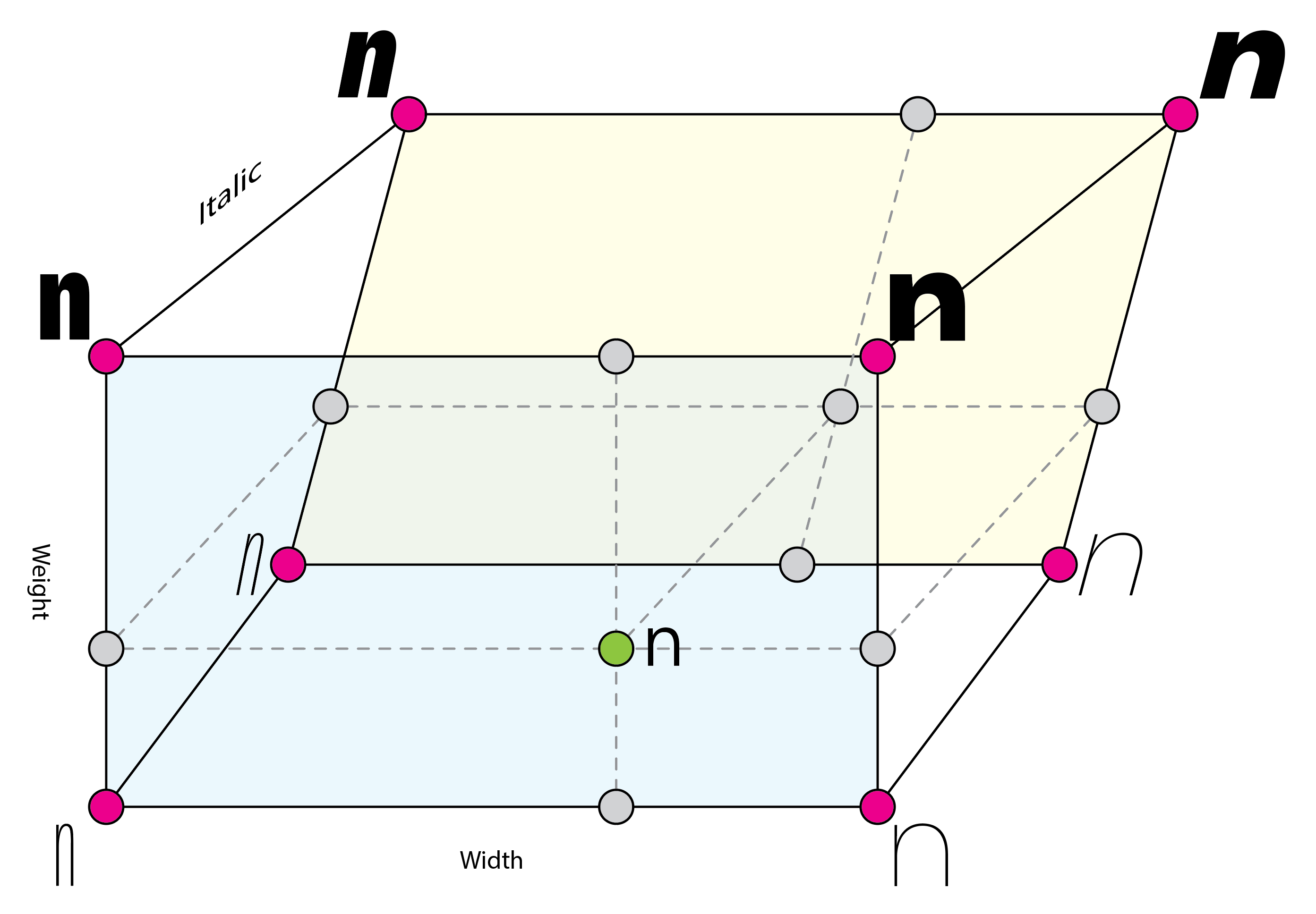
I have a variable font design space like this with the masters in the corners (pink). If I want the variable font origin to be Regular and I add that master (green), will I also need to add masters for the locations indicated by gray dots to keep everything rectangular?
- yes, you need all the other extra maters too.
- why do you like to do it in the first place? It mostly just increases the file size.
Ok, thanks for the clarification. The variable font tutorial doesn’t mention the need for additional masters if the added master falls in the middle of the design space so you may want to update it.
I was thinking having the default appearance be the Regular might be nice but seeing all the extra masters that would be needed I don’t think it will be worth it.
Would be amazing to set up an instance or use axis to define the variable font origin. something like a custom param: {wght: 400, slnt: 0}
I do this in my custom export plugin, which is available on request, with many more options.
You can simply add a custom parameter:
"Subset Axis": "wght;100,400,900"
which follows the fonttools syntax, meaning that the middle value (if three values are provided) defines the variable font origin, and the other two values the min and max values.
This way, you can export a subset variable font, optionally with a custom variable font origin, although fonttools sets it to 400 by default anyway, if I remember correctly.
1 Like
your plugin uses the new CLI?
No. It’s a Glyphs export plugin, so it has an interface that shows up when you click File > Export. Like the other export options.
Can you share the plugin name? or repo?
It’s a commercial plugin, available on request. You can get in touch with me in private if this interests you. It’s targeted at commercial foundries that have their personal standards and file structure.
1 Like
I see. Thanks. I’ll try to figure out using fonttools for now
That’s all the plugin uses. It runs fonttools on the exported VF, so you can emulate the behaviour 1:1. Have a look at the varLib instancer module.
1 Like