Why did you get rid of it in 3.5? The thing you replaced it with in the”Fixer” script screws up my curves! Tunnify was SO reliable. I knew what it did, it left my curves intact, it did its job. It does not deserve to die!
I have it backed up if you need it. Send me a pm
It is now integrated in the Bézier Fixer script. And it combines the functionality of both Tunnify scripts, plus gives you harmonization and handle realignment options, and a checkbox for doing the same on all masters of selected glyphs:
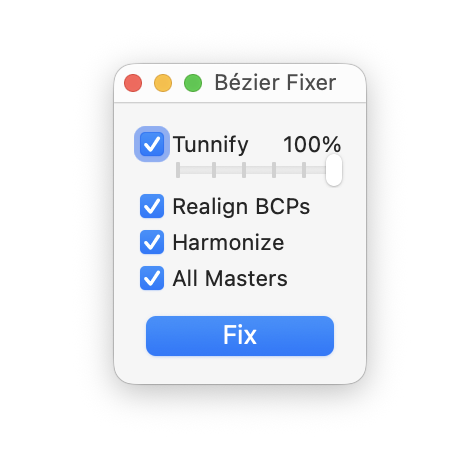
Mini UI so you can leave it floating around.
I saw that and tried it with bad result. I even mentioned it in my comment. It is not a “fixer” if it does damage.
Hello Dezcom,
Can you show a sample with original curve and after to apply Tunnify?
I don’t have it. I undid the application and started over with RMX Harmonizer instead.
I think my problem was that I left the Fixer at default with all the checkmarks on. Later, I unchecked them all except Tunnify, and it was much better.
I never saw any notification about the change from Tunnify and got no instructions on using the new Fixer, so it was user error.
I find the Fixer really annoying.
- It brings up a separate window, instead of just running the script. Generally, having really useful scripts hidden within another script (that bundles scripts in a UI) is really inefficient for routines. I cannot put the Tunnify script into my FastScripts or assign a keyboard shortcut anymore.
- It doesn’t respect node selection and just applies it to all nodes now. Very annoying and I don’t know how to circumvent this.
Please make the Tunnify scripts separate again.
I like having both Tunnify one and two, they are slightly different and allow me to control in detail.
I just downloaded the original script from the previous commit and put it in my own scripts folder. So I can keep using it without the UI.
Also I find the fact that the Bezier Fixer script is called Bézier Fixer in the menu annoying as I now have take the extra step of getting the é letter up when searching for it.
You can just type ‘Fixer’ for searching.
And if you use it a lot, the idea was to keep it small so the window can stay floating around. I do not see the disadvantage over having it in FastScripts.
The algorithm is the same as Tunnify 2 and with the setting 50% it is exactly what the script did. At 100% it is practically Tunnify 1, a slightly different algorithm than the original, but the results are hardly different. Bézier Fixer/Tunnify 2 looks to keep the position at t=0.5 on the curve.
I’ll see if I can bring back the selection.
I find this difficult to justify. I’ll use it often enough to want to have it handy (i.e. accessible through FastScripts or a menu bar search), but not enough to want an extra floating window cluttering my view.
This is a general thing I find annoying: scripts that serve single functions are unified into a “wrapper” script with a UI. Such as the “Add entry/exit anchors to side bearings”. This used to be a single script, now I have to bring up the Entry/Exit Manager and use my mouse to click onto a button in order to run the script.
Anything I can’t assign keyboard shortcuts to (or that I can run by searching the menu items) is annoying. As a programmer, you’ll surely understand the desire to minimise leaving the keyboard.
As a programmer, you’ll also understand the desire to reduce the immense clutter that the 300+ mekkablue scripts have become, effectively making them pretty inaccessible. When I am doing path work, the tiny window has proven to work well for me.
Sorry, the keyboard argument does not hold in path work, because your more on the mouse then on the keyboard, also because you need to keep making selections.
But feel free to keep the keystroke-ready functions in your repo, no prob.
I always use a mouse for this
Update: selection is respected again. And it should work on the same selection on all compatible masters if the all masters checkbox is on.
thank you so much!!!
Plus there is a little settings foldout now for live previewing and backing up original paths in the background. The are off by default, and per session.
If the little window looks weird, try uninstalling and reinstalling the vanilla module in plugin manager and restarting the app.
I have not noticed that.
That is the preview. Update to the latest version. Now it is off by default.
