Thanks. I’ll be able to give it a try tomorrow.
1 Like
I hope it works well for you! @George_Thomas
I’m looking forward to your feedback and to hearing about your use cases.
@GeorgSeifert , @FlorianPircher @Dezcom @tribby
Every day it seems to open up something new for me — a fresh idea or a new way to use it.
It’s become kind of a good pal — sometimes it doesn’t do exactly what I want, but it’s still super useful once you learn how to guide it.
Context really matters. Start by giving it the right setup — the task, the font you’re working with, the glyphs to edit, etc. That makes a huge difference in how it responds.
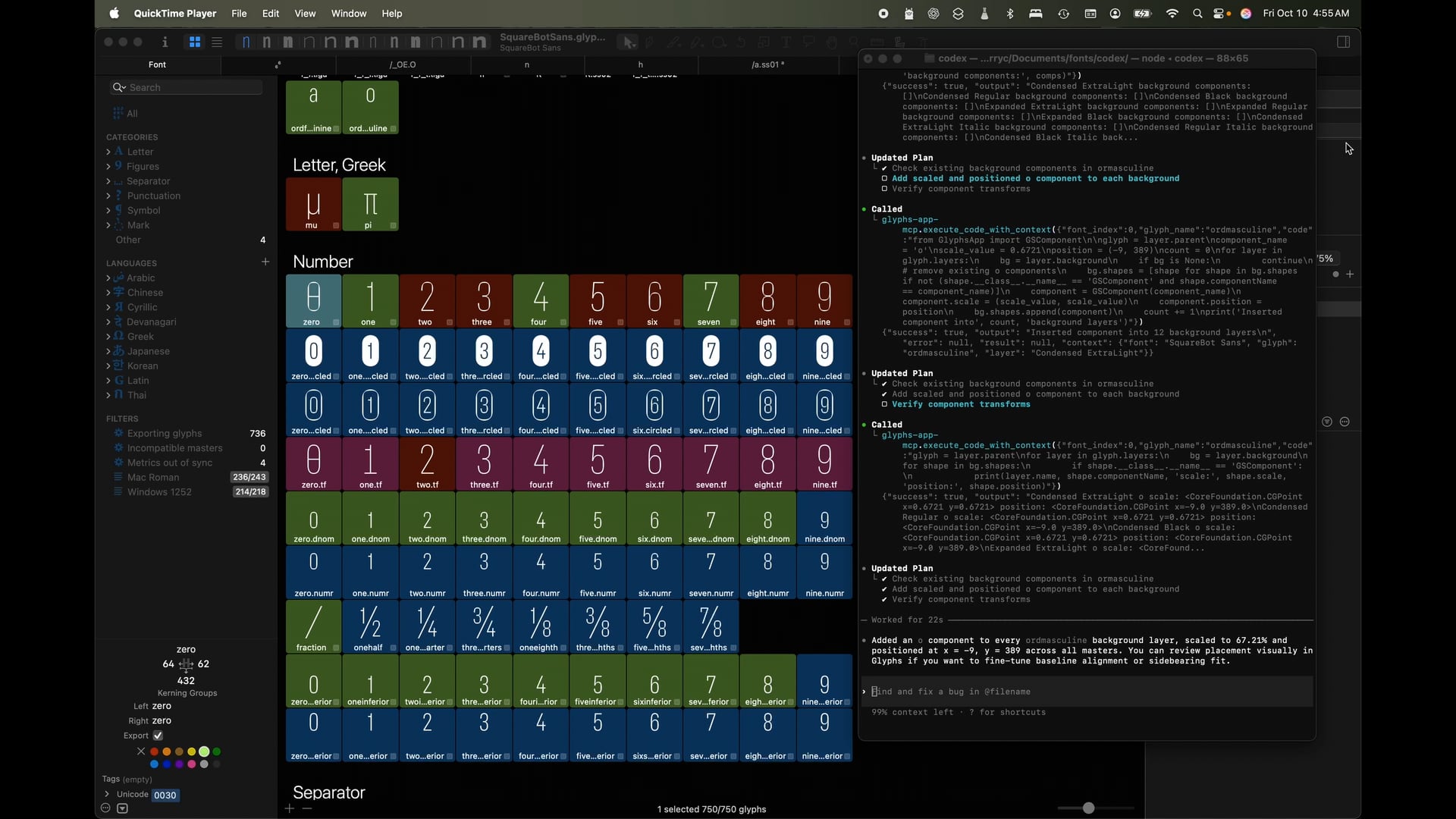
I made a short video showing how it works with Codex in a terminal window — the same approach applies to Claude or any IDE.
The installation was definitely the trickiest part of the process, but once it’s set up, it really starts to show its potential.
3 Likes
Thierry,
Looks very promising! Keep up the good work!!!
Chris
1 Like
Thank you Chris. @Dezcom
Thierry, the install script worked flawlessly. Thanks so much for writing it. In the next few days I will find some things to try out. I have one in mind already.
1 Like
@George_Thomas, Thank you for your feedback.
@thierryc Hi Thierry,
I’d love to try the MCP plugin, but unfortunately, while it seems to install, I can’t find the “Start MCP Server” option under the Edit menu.
I’m currently using the latest Glyphs version 3.4 (3434) with Python 3.11 (Glyphs version). Am I missing a step? Would you be able to guide me on how to properly install the plugin?
Thanks so much for your help!
It should work.
I’m here to help you. I’ll send you a DM. @TasosV
2 Likes
My version of Glyphs is 3.4.1, and my Python is 3.12 and 3.11.
The script is not working for 3.14.
for a nicer install cli : (python3 -m pip install --user rich)
Python 3.14 will be supported very soon.
1 Like
Just send me a DM if you need help with the installation.
I updated the installation script yesterday.
A new topic for Ai Prompt and MCP server.
Thanks so much for your help, Thierry! It took a few attempts to get everything installed, but after following your guidance, I was able to reinstall the plugin and it’s now working perfectly. The terminal output matches exactly what I expected, and I can finally see the “Start MCP Server” option under the Edit menu. I’ve started experimenting with the plugin using Claude, and I must say the concept is brilliant, really impressive work!
1 Like
Thank you very much to the developer. This tool is really amazing! However, I have a question. The development tool I’m using is Trea, but it seems that no corresponding configuration solution is provided. Could you please tell me how to configure this MCP in Trea?
Thanks a lot for the feedback, I’m really glad you like the tool!
It should be possible to use it with Trea, but you’re right — I don’t have a ready-made configuration example for it yet. The setup will mostly depend on how Trea expects MCP servers to be registered and started.
I’ll send you a DM to explore the options.
T.
Hi @gor.jious and @Thierry,
Back in June, I mentioned this was just my personal “workbench” and that I was refactoring it.
Well, it took a bit longer than expected (as these things always do), but I finally managed to package it up properly!
I just released v1.0.0 on PyPI. It runs as a standard MCP server now. And yes, I kept the promise of digging into the internal structure—it now parses the .strings files directly from the app to ensure all UI terms are accurate across languages.
I wrote a proper introduction in the Showcase category here: Sharing my MCP server for AI (API, Handbook & Localization context)
Thanks for the interest back then—it really motivated me to finish this up.
2 Likes
Hi,
Really nice work on glyphs-info-mcp. I’m going to install it and test it this week to see how well it can pair with my Glyphs MCP server (API lookup first → then execute, to avoid hallucinated calls).
Quick context on my side: I recently made my Glyphs MCP repo public (Apache-2.0) and pushed updates like bundling the ObjectWrapper docs as MCP resources (so clients can resources/list → resources/read), plus reliability upgrades (e.g. copy_glyph now duplicates via Glyphs’ native duplication, set_glyph_paths clears outlines correctly, save_font runs on the main thread).
If it works well, I’d love to collaborate on a shared “lookup-first then execute” workflow + starter configs for Claude/Codex (and more).
—T
Hi, I’ve added a new status floating window to the plugin to let users know if the server is running well. 
Edit > Glyphs MCP Server Status…
—T.
Tips of the day:
Always start with this prompt to give some context to the LLM: “Use the Glyphs MCP Server to list the current open fonts in the app.”
You can ask what you want after referring to the font if you have multiple open files.
1 Like
Hi Thierry,
Thanks! It’s exciting to see the ecosystem growing.
Regarding the feasibility:
Yes, technically this sounds like a classic “Planner + Actor” pattern in MCP.
My glyphs-info-mcp acts as the Context Provider (ensuring the LLM knows the correct API syntax and Handbook logic), while your tool acts as the Executor.
Without accurate API context, “Actor” tools often struggle with hallucinated parameters, so I agree that chaining them (Lookup → Execute) would theoretically improve reliability significantly.
On the workflow philosophy:
Personally, I tend to use MCP to “Generate Python Scripts” rather than for “Direct Manipulation”, mostly because font data is so delicate that I prefer reviewing the code in the Macro Panel before applying changes in bulk.
But I’d be very curious to see your “lookup-first then execute” experiment! If you create a starter config that pairs them, feel free to ping me. I’d be happy to link to it from my README as a "Partner Project.
Let’s see what the AI can do when it actually has the manual in hand! 
Yesterday, I pushed an update to improve the MCP server’s resource layer, along with a few other small refinements. I’ll keep you posted.
Please Update.
Recent update to Glyphs MCP resources: there is now a concise in-app guide at glyphs://glyphs-mcp/guide to orient assistants to the tools-first workflow. Documentation access is streamlined with two helper tools—docs_search and docs_get —that let clients search bundled Glyphs SDK docs and fetch specific slices by ID or path without overloading the resource list.
1 Like