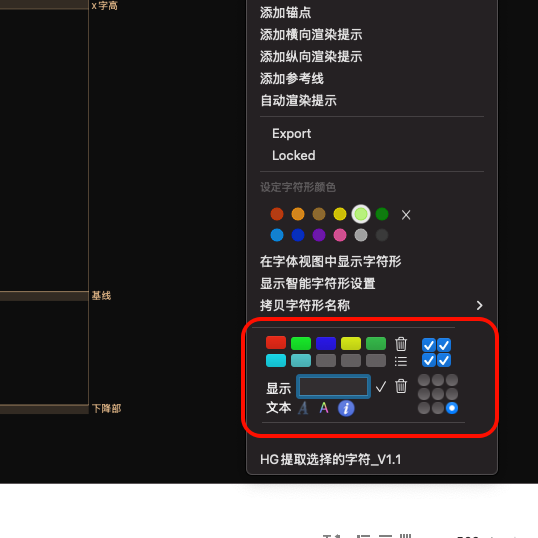
create a NSMenuItem,and item.view is a customview,I want to change some control’s status in customview when I pressed down Option key,how to listen for this event?
If the menu item just contains some text that changes when holding down the Option key, then this is fairly easy by adding two menu item, setting the alternate option on the second one and assigning it a keyEquivalentModifierMask of NSEventModifierFlagOption.
If you need the custom view for something more complex than just text, then you would need to install an event monitor. (+[NSEvent addLocalMonitorForEventsMatchingMask:handler:], let me know if that is the case and I can provide some sample code.)
Yes, I have added a slightly complex custom view to the right-click menu. After clicking on the right-click menu, I hope that pressing the option key can change some states or properties of some controls in the view. If you can provide me with some sample code, I would really appreciate it!
In the picture is a custom view displayed in my right-click menu, which contains many controls. I want some controls, such as buttons, to change color or have other changes when the option key is pressed. How can I write a listening event to monitor the pressing of the option key and then modify the elements in the view? It’s like the color markers in the right-click menu: normally, the color labels of characters are displayed, and when the option key is pressed, the color labels of the layers are displayed.
The problem with setting the delegate is that someone else might also try to do something similar on the same menu. And then only one of the two will work. And in this case, the color label selector is setting the delegate …
I don’t found a better solution, yet.
I add NSMenuDelegate,and in this -(void)contextMenuCallback:(NSMenu *)menu forSelectedLayers:(NSArray *)glyphs event:(NSEvent *)event,I set [menu setDelegate:self];
I add your code ,but it didn’t triggered _eventMonitorHandle = [NSEvent addLocalMonitorForEventsMatchingMask:NSEventMaskFlagsChanged
handler:^NSEvent \*(NSEvent \*event) {}\]; when I pressed any key.
This turned out to bit more tricky than expected. Here we go:
Add a CFRunLoopObserverRef as an instance variable:
CFRunLoopObserverRef _runLoopObserver;
and then use CFRunLoopObserverCreateWithHandler to handle events:
if (_runLoopObserver == NULL) {
	__block BOOL latestIsOptionDown = ([NSEvent modifierFlags] & NSEventModifierFlagDeviceIndependentFlagsMask & NSEventModifierFlagOption) != 0;
	// add observer for events
	_runLoopObserver = CFRunLoopObserverCreateWithHandler(NULL, kCFRunLoopBeforeWaiting, true, 0, ^(CFRunLoopObserverRef observer, CFRunLoopActivity activity) {
		if (self->_runLoopObserver != NULL && [self->_thisView enclosingMenuItem] == nil) {
			// view no longer in menu item: menu is closed: remove observer
			CFRunLoopObserverRef runLoopObserver = self->_runLoopObserver;
			self->_runLoopObserver = NULL;
			CFRunLoopObserverInvalidate(runLoopObserver);
			CFRelease(runLoopObserver);
			return;
		}

		BOOL isOptionDown = ([NSEvent modifierFlags] & NSEventModifierFlagDeviceIndependentFlagsMask & NSEventModifierFlagOption) != 0;
		if (isOptionDown == latestIsOptionDown) {
			// observed event did not affect the Option key: early exit
			return;
		}

		// the Option key state did change: update view
		latestIsOptionDown = isOptionDown;
		[self updateMenuItemViewIsOptionDown:isOptionDown];
	});
	CFRunLoopAddObserver(CFRunLoopGetCurrent(), _runLoopObserver, kCFRunLoopCommonModes);

	// set up view with initial state
	[self updateMenuItemViewIsOptionDown:latestIsOptionDown];
}
I placed this code in contextMenuCallback:forSelectedLayers:event: after adding the item to the menu. It’s all nicely self-contained, checking whether the view still belongs to a menu item and if not, unregisters its own observation. Then main view update is then performed in the following method: