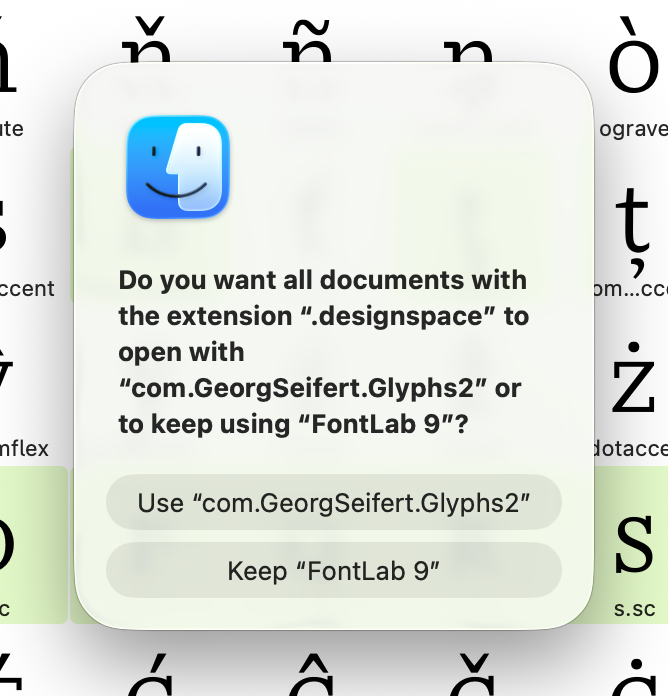
Since I updated to macOS Tahoe (26.4) opening a .glyphs file always brings up this prompt from the Finder.
Any idea why it does this and how to stop it?
Since I updated to macOS Tahoe (26.4) opening a .glyphs file always brings up this prompt from the Finder.
Any idea why it does this and how to stop it?
I am not sure why it keeps asking, but you can try selecting a .designspace file in Finder, getting its info with ⌘I, and setting a standard app explicitly.
I can’t find any files with the .designspace extension.
I duplicated a .png and named it as .designspace
Get info on this told me it opened with Glyphs 3.app
Click on Change All but the message still pops up from Finder 
I don’t have Glyphs 2 on this Mac, so I don’t know where it got that from
Wait, I thought you opening a .designspace is what prompted the dialog in the screenshot. Did it just open itself? Or did you perform some action that then opened the dialog? Which of the buttons do you click on?
Nothing different – just double-clicked a .glyphs file as I usually do to open it.
Only thing that has changed is the update to macOS 26.4
I don’t have any .desginspace files – what are they?
Thanks for the warning, Jeremy, So glad I waited to update to Tahoe.
I had a ‘moment’ and made the mistake of updating
It also threw my Wacom out and messed up my network.
It’s not a happy mac – I’ve threatend it with Windows . . .
This is stange, indeed. Firstly, your mac knows about “com.GeorgSeifert.Glyphs2” which suggests there is a Glyphs 2 app hiding somewhere. And then the dialog being about “.designspace”. Could this be related to an update from FontLab 9, since it is also mentioned in the dialog?
Apple certainly has taken a turn for the worse lately. Perhaps they need to be poked in the eye with a pointed stick? 
that looks like a bad Launch Services database. Run this in the Terminal and restart your mac:
/System/Library/Frameworks/CoreServices.framework/Versions/A/Frameworks/LaunchServices.framework/Versions/A/Support/lsregister -delete -seed -r
No luck Georg, still get the same pop up.
It must be macOS 26.4 as the same thing occur on my MacBook
What happened when you run the line in Terminal?
Lots of scrolling. I restarted and the same popup appears.
Actually it isn’t when I open a .glpyhs file. It’s when I launch Glyphs App itself.
Can you do
/System/Library/Frameworks/CoreServices.framework/Versions/A/Frameworks/LaunchServices.framework/Versions/A/Support/lsregister -dump
and send me the result (probably even more scrolling) in a private message.
Can you try deleting this file (or move it somewhere else to be able to put it back if needed)?
~/Library/Preferences/com.apple.LaunchServices/com.apple.launchservices.secure.plist
In User / Library / Preferences
I have ‘com.apple.LaunchServices.QuarantineEventsV2’
and a folder ‘com.apple.LaunchServices’ which contains 3 files.
’com.apple.LaunchServices.SettingsStore.sql’
’com.apple.LaunchServices.plist’
’com.apple.launchservices.secure.plist’
Removed these to the Desktop but still get the Finder prompt.
Did you restart since you deleted those files?
Couldn’t remember, so I redid it and restarted.
Same Finder popup
I’m getting this popup, too. I hope we can resolve this soon. It’s not stopping production, but it’s a real annoyance. Currently running Tahoe 26.4 and Glyphs 3.4.1 (3436).
Hi Mark – like me, you made the mistake of updating